
Box Direct Link Generator EN
Asif Kamboh · EEdge MV3
Generate direct download links from Box shared URLs with history tracking and bulk support.
截图
简介
📌 Box Direct Link Generator for Microsoft Edge
Version 2.1: Advanced Features, History Tracking, Bulk Processing & Modern UI
Box Direct Link Generator v2.1 is a powerful and feature rich Microsoft Edge extension that instantly generates direct download links from Box.com shared file URLs.
Version 2.1 introduces a complete redesign with advanced functionality, link history tracking, bulk URL processing, dark and light themes, enhanced file information, and a modern glassmorphism interface. It is designed to make Box file downloads faster, easier, and more convenient.
🆕 What's New in Version 2.1?
Major Features Added:
🔹 Link History Tracking: Automatically saves generated links with timestamps, file names, file sizes, and file extensions. Easily access your previously generated links whenever you need them.
🔹 Bulk Link Generation: Process multiple Box.com URLs at once. Paste up to 100 links and generate direct download links in bulk.
🔹 Dark and Light Theme: Switch between dark and light themes according to your preference.
🔹 Export History: Export your complete link history as a text file for backup, storage, or sharing.
🔹 Smart Deletion: Delete individual history entries or clear your complete history with confirmation dialogs.
🔹 Enhanced File Information: View detailed file information including file name, file size, and file extension.
🔹 Modern Glassmorphism UI: Enjoy a clean, beautiful, intuitive interface with smooth animations and a responsive design.
🔹 Performance Optimized: Faster link generation, improved validation, better error handling, and efficient processing.
🖥️ Key Features & How It Works
1️⃣ Generate Direct Links Instantly
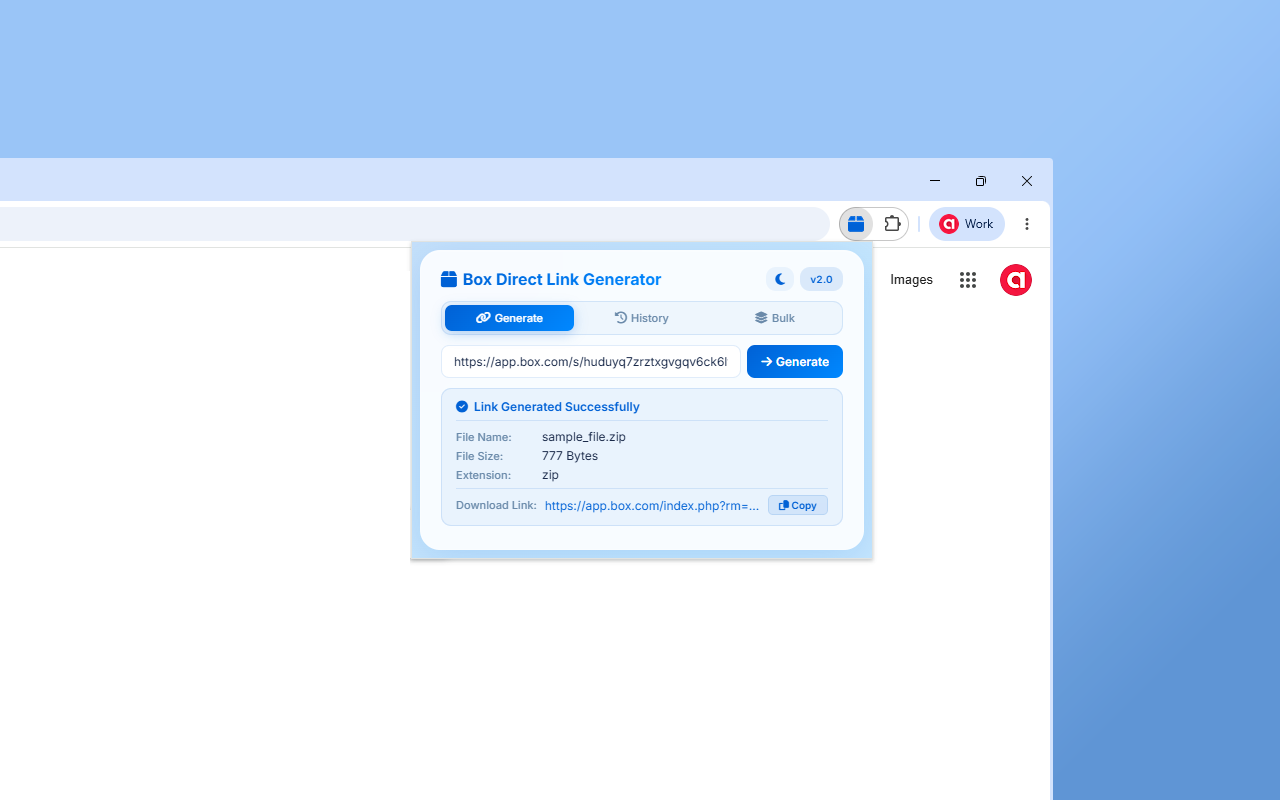
Simply paste a shared Box.com file URL and generate a direct download link.
The extension provides:
• File Name: Displays the exact file name, such as document.pdf
• File Size: Shows the file size in Bytes, KB, MB, GB, or TB
• File Extension: Identifies the file type, such as ZIP, PDF, MP4, DOCX, XLSX, and more
• Download Link: Generates the available Box.com direct download link
• One Click Copy: Copy the generated link instantly with a single click
2️⃣ Link History Management
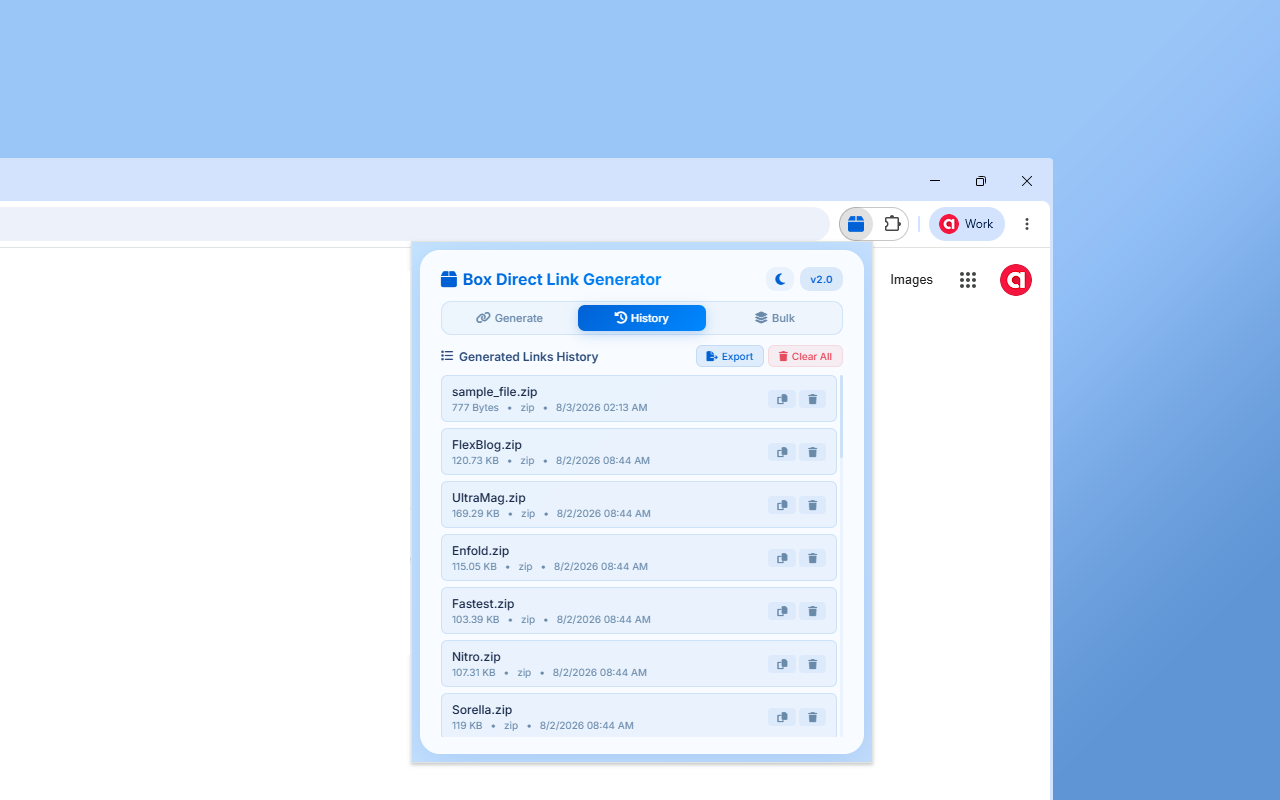
Every generated link can be saved in your local history for easy access later.
History includes:
• Timestamp: Date and time when the link was generated
• File Details: File name, size, and extension
• Download Link: Saved generated link
• Export Option: Export your complete history as a text file
• Cleanup Tools: Delete individual entries or clear the complete history
3️⃣ Bulk Link Processing
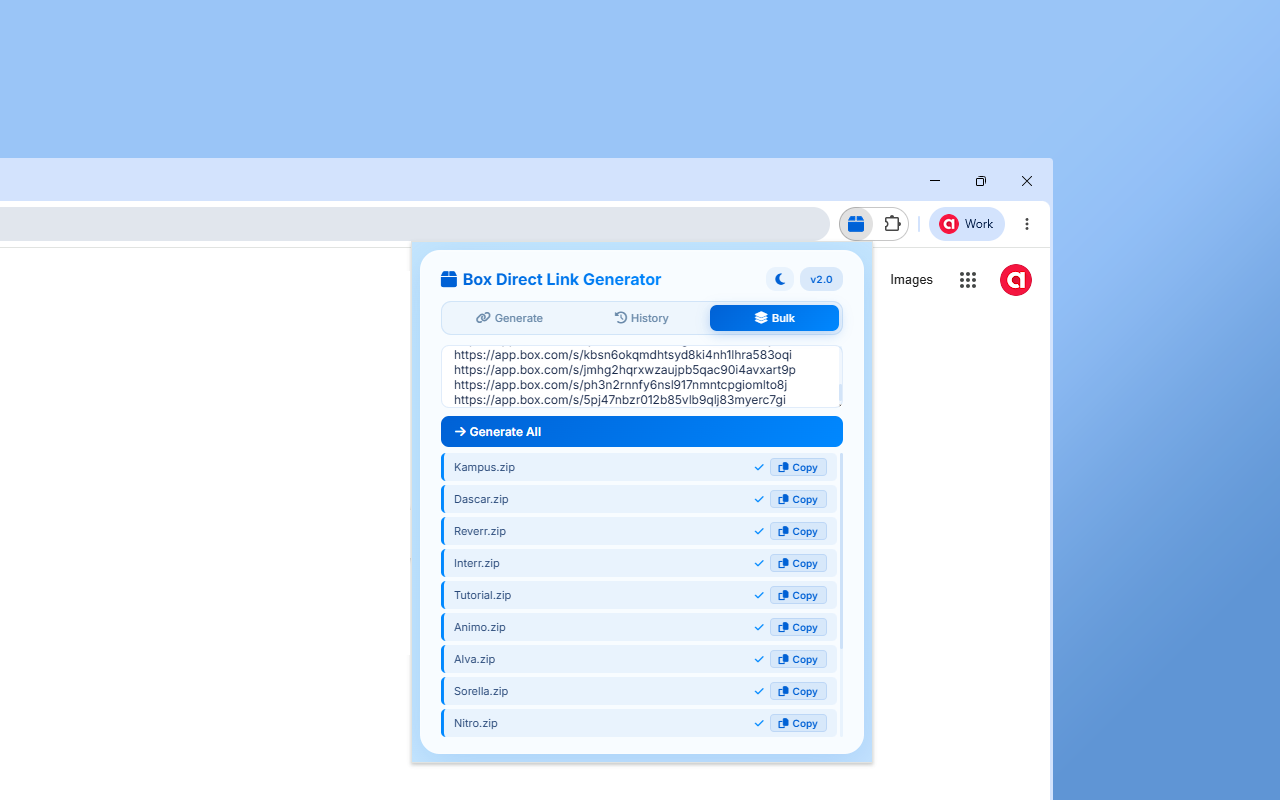
Save time by processing multiple Box.com URLs at once.
Features include:
• Batch Generation: Process up to 100 Box URLs simultaneously
• Progress Tracking: View real time progress and status updates
• Individual Results: See the success or failure status for each URL
• Individual Copy Buttons: Copy any generated link with one click
4️⃣ Generate Box Direct Download Links
The extension is designed to generate direct download links from publicly accessible Box.com shared file URLs.
Example format:
https://app.box.com/index.php?rm=box_download_shared_file&shared_name=XXXXXXXX&file_id=f_XXXXXXXX
Depending on the Box.com file and sharing configuration:
• Direct Download: Access the file download without manually navigating through multiple pages
• Public File Support: Works with publicly accessible shared files
• Multiple File Types: Supports common file types such as ZIP, PDF, MP4, DOC, DOCX, XLS, XLSX, and more
5️⃣ Modern and User Friendly Interface
The extension provides a simple and modern interface designed for an easy user experience.
• Tabbed Interface: Easily switch between Generate, History, and Bulk sections
• Dark and Light Mode: Choose your preferred appearance
• Glassmorphism Design: Clean and modern visual experience
• Responsive Layout: Designed to work smoothly across different screen sizes
• Loading Animations: Visual feedback during link generation and processing
👨💻 Who Can Benefit?
• Students and Researchers: Quickly access Box hosted PDFs, presentations, documents, and study materials
• Developers and IT Teams: Generate direct links for coding assets, ZIP archives, documents, and other files
• Businesses and Teams: Easily manage and share accessible Box file links
• Cloud Storage Users: Simplify file management with convenient direct download links
• Content Creators: Make publicly shared Box files easier to access and share
⚙️ How to Use the Extension?
Generate a Single Link:
1️⃣ Install Box Direct Link Generator from the Microsoft Edge Add-ons Store
2️⃣ Click the extension icon in your Microsoft Edge toolbar
3️⃣ Paste a publicly accessible Box.com shared file URL into the input field
4️⃣ Click "Generate" or press Enter
5️⃣ Copy the generated direct download link with one click
Generate Multiple Links in Bulk:
1️⃣ Open the "Bulk" tab
2️⃣ Paste multiple Box.com URLs, one URL per line
3️⃣ Click "Generate All"
4️⃣ Monitor the processing progress
5️⃣ View the generated results and copy individual links as needed
Manage Your Link History:
1️⃣ Open the "History" tab
2️⃣ View previously generated links and file information
3️⃣ Copy a previously generated link whenever needed
4️⃣ Delete individual history entries
5️⃣ Export your history as a text file
6️⃣ Clear your complete history when needed
🤝 Why Choose Box Direct Link Generator?
🔹 Easy to Use: Simple interface designed for quick and convenient link generation
🔹 Bulk Processing: Process multiple Box.com URLs at the same time
🔹 History Tracking: Keep track of previously generated links
🔹 Modern UI: Enjoy a clean interface with dark and light themes
🔹 Privacy Focused: No third party tracking or unnecessary data collection
🔹 Local Processing: Your history is stored locally in your browser
🔹 Lightweight: Designed to use minimal browser resources
🔹 Free to Use: Completely free to use with no hidden charges
🔹 Microsoft Edge Compatible: Built specifically to work with the Microsoft Edge browser
📋 V…
Box Direct Link Generator 是做什么的
Box Direct Link Generator 是一款面向 Edge 的实用工具类扩展,主要用来解决浏览器里某类具体的小问题。官方对它的介绍是:Generate direct download links from Box shared URLs with history tracking and bulk support.在微软 Edge 加载项商店上,它当前版本 2.1,约 48 名用户。
适合什么人用
从功能定位看,Box Direct Link Generator 更适合想补上浏览器原生缺失功能的用户。如果你平时只是偶尔遇到相关需求,用浏览器自带功能也能凑合;但如果这件事每天都发生,装一个专门处理它的扩展通常比手动操作省事得多。
怎么安装 Box Direct Link Generator
- 打开微软 Edge 加载项商店上的官方页面;
- 点「添加到浏览器」并确认权限提示;
- 装好后在扩展列表里固定图标,方便随时开关。
本站只做索引与介绍,安装包来自官方商店。如果商店页面提示当前地区不可用,说明该扩展未在你所在区域上架。
常见问题
Box Direct Link Generator 是免费的吗?
Box Direct Link Generator 在微软 Edge 加载项商店免费提供下载。它是浏览器扩展,装上就能直接用,不需要注册账号。
Box Direct Link Generator 安全吗?
它只申请了 0 项权限,范围比较克制,没有申请「读取所有网站数据」这种大权限。
Box Direct Link Generator 支持哪些浏览器?
当前收录的版本来自微软 Edge 加载项商店,适用于 Edge。同一个扩展在其他商店可能有对应版本,但功能与版本号不一定相同。
怎么卸载 Box Direct Link Generator?
在扩展管理页找到 Box Direct Link Generator,点移除即可。它在本地保存的设置会一起清掉,不会残留数据。
权限清单 来自 manifest.json 原文
接口权限 2
clipboardWritestorage