
Bookmark Manager EN
AmmarSaeed · EEdge MV3
Save, organize, import, export, and manage bookmarks locally.
<all_urls>),意味着它可以读取你在任意站点的页面内容,包括已登录的页面。这是许多扩展正常工作的必要条件,但也值得你确认来源可信。
截图


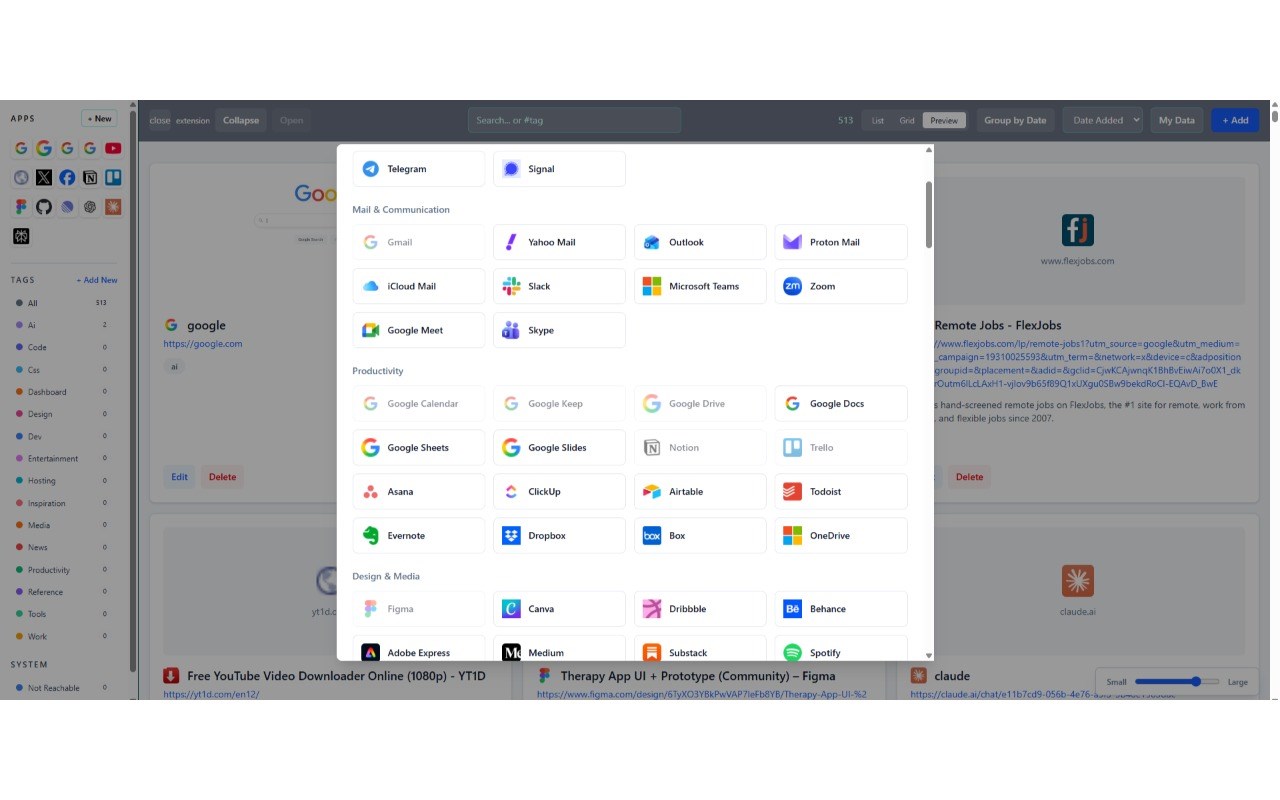
简介
Bookmark Manager: Your Ultimate Local Bookmark Organization and Management Solution
Bookmark Manager is a comprehensive browser extension designed to put full control of your bookmarks in your hands. Tailored for versatility, privacy, and ease-of-use, this extension enables you to save, organize, import, export, and manage all your bookmarks locally within your browser, eliminating the need for cloud synchronization or third-party accounts. Its modern, user-friendly interface provides quick and efficient access, helping you maintain a well-structured and instantly searchable bookmark collection. Whether you are a power user with hundreds of saved links or simply want a more organized and functional way to manage your bookmarks, Bookmark Manager delivers the tools necessary for stress-free organization and improved personal productivity.
Thanks to robust import and export capabilities, Bookmark Manager lets you seamlessly transfer bookmarks between browsers, back up your data in multiple file formats, and restore your collection whenever needed. Advanced tagging, grouping, and cleanup features help keep your bookmarks tidy—removing duplicates, highlighting bookmarks missing descriptions, and identifying unreachable links to ensure you never lose track of important websites. The intuitive interface offers real-time search with tag support and a variety of sorting options, allowing you to find and organize bookmarks instantly by date, name, ranking, or custom criteria that suit your preferences.
Leveraging browser-native APIs, Bookmark Manager stores all data locally, ensuring complete privacy and security. Users can effortlessly add, edit, delete, and back up bookmarks with just a few clicks, making it an ideal tool for knowledge workers, researchers, students, or anyone who values efficient, private web navigation. Context menus and action buttons streamline everyday tasks, while intelligent management features anticipate your needs to keep your bookmark collections clean, relevant, and easy to navigate. Compatible with Edge, Chromium, and other similar browsers, Bookmark Manager is the definitive local bookmark management solution—no accounts, no ads, just your data securely managed within your own browser.
Key Features:
- Powerful Local Storage: Save, organize, and manage all your bookmarks locally in your browser without needing any cloud synchronization.
- Flexible Import and Export Options: Easily import bookmarks from Edge or other browsers’ exports, files, or clipboard. Export your bookmarks in HTML, JSON, TXT formats, or directly back to Edge for seamless browser migration or backup.
- Advanced Cleanup Tools: Automatically remove duplicate bookmarks, flag entries that lack descriptions, check whether URLs are reachable, and clean up tags to maximize organization and data integrity.
- Custom Tagging and Grouping: Assign custom tags to bookmarks, use tag-based search syntax, and group bookmarks by tags or by date to keep your collection neatly categorized and easy to explore.
- Intuitive Search and Sorting: Find bookmarks instantly with real-time search capabilities that support queries by title, tag, or keyword. Sort your bookmarks by date added, alphabetical name, ranking, or custom criteria as you prefer.
- Responsive User Interface and Flexible Views: The adaptive side panel and grid controls provide multiple viewing modes. Customize column sizes, filter visible tags, and enjoy a responsive design that works smoothly across different screen sizes.
- Backup and Restore Functionality: Create complete backups of your bookmark data in JSON format, making it simple to safeguard your collection or migrate your data across different browsers or devices whenever needed.
How It Works:
1. Install Bookmark Manager from your browser’s extension store.
2. Access the extension via its action button or the context menu to add, edit, or delete your bookmarks.
3. Use tagging to organize your bookmarks intuitively and employ the search functionality for quick location of saved links.
4. Import bookmarks from Chrome, files, or clipboard and export bookmarks in your preferred format including HTML, JSON, or TXT, or export directly back to Chrome.
5. Utilize cleanup tools to automatically remove duplicate bookmarks, flag entries missing descriptions, and verify that all URLs are reachable, ensuring a clean and optimized collection.
6. Use the backup and restore features to safely migrate or recover your bookmark data whenever necessary.
7. Customize view settings, sorting options, and sidebar layout to tailor the bookmark management experience to your liking.
Privacy: - No personal data collected. All bookmark data is stored locally on your device, ensuring your privacy and security. Bookmark Manager does not transmit any information externally; please see the privacy policy for further details.
Bookmark Manager 是做什么的
Bookmark Manager 是一款面向 Edge 的效率工具类扩展,主要用来管住注意力、屏蔽干扰站点、记录时间。官方对它的介绍是:Save, organize, import, export, and manage bookmarks locally.在微软 Edge 加载项商店上,它当前版本 0.1.0,约 43 名用户。
适合什么人用
从功能定位看,Bookmark Manager 更适合想专注工作学习、减少无效刷网页的用户。如果你平时只是偶尔遇到相关需求,用浏览器自带功能也能凑合;但如果这件事每天都发生,装一个专门处理它的扩展通常比手动操作省事得多。需要注意的是它作用于所有网站,装上后建议先观察一两天,确认不影响常用站点的正常使用。
怎么安装 Bookmark Manager
- 打开微软 Edge 加载项商店上的官方页面;
- 点「添加到浏览器」并确认权限提示;
- 装好后在扩展列表里固定图标,方便随时开关。
本站只做索引与介绍,安装包来自官方商店。如果商店页面提示当前地区不可用,说明该扩展未在你所在区域上架。
常见问题
Bookmark Manager 是免费的吗?
Bookmark Manager 在微软 Edge 加载项商店免费提供下载。它是浏览器扩展,装上就能直接用,不需要注册账号。
Bookmark Manager 安全吗?
它只申请了 0 项权限,范围比较克制,没有申请「读取所有网站数据」这种大权限。
Bookmark Manager 支持哪些浏览器?
当前收录的版本来自微软 Edge 加载项商店,适用于 Edge。同一个扩展在其他商店可能有对应版本,但功能与版本号不一定相同。
怎么卸载 Bookmark Manager?
在扩展管理页找到 Bookmark Manager,点移除即可。它在本地保存的设置会一起清掉,不会残留数据。
权限清单 来自 manifest.json 原文
站点访问(可选) 1
<all_urls>
接口权限 5
activeTabbookmarkscontextMenusscriptingtabs
其他商店也有这款
同一款扩展在不同浏览器下的版本,权限与更新节奏可能不同
