Bilingual PDF Translator EN
HuyHoang · EEdge MV3
Chrome & Edge Extension for reading, layout extraction, and bilingual translation of PDF documents.
截图
简介
Bilingual PDF Translator is a lightweight, high-performance Microsoft Edge extension designed for researchers, software engineers, students, and professionals who need accurate, context-aware English-to-Vietnamese translation of PDF documents while preserving original visual layout and reading flow.
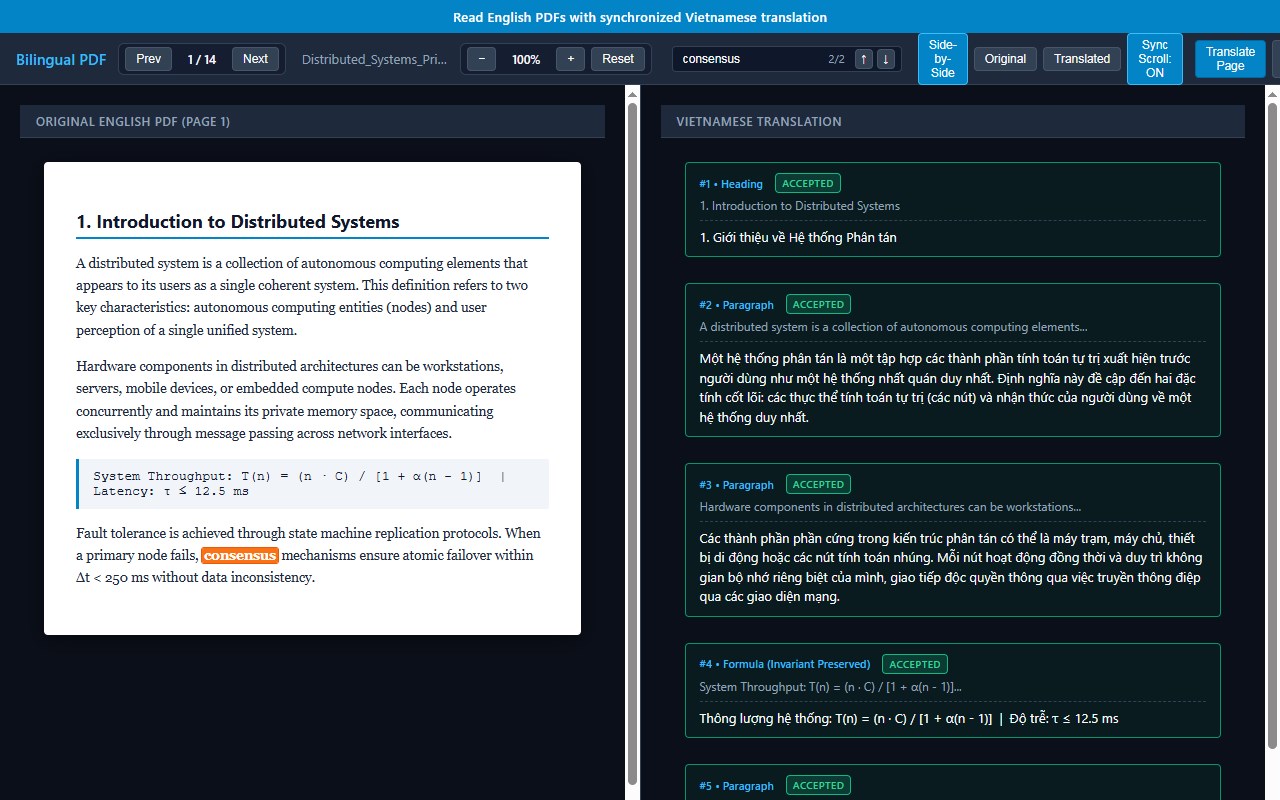
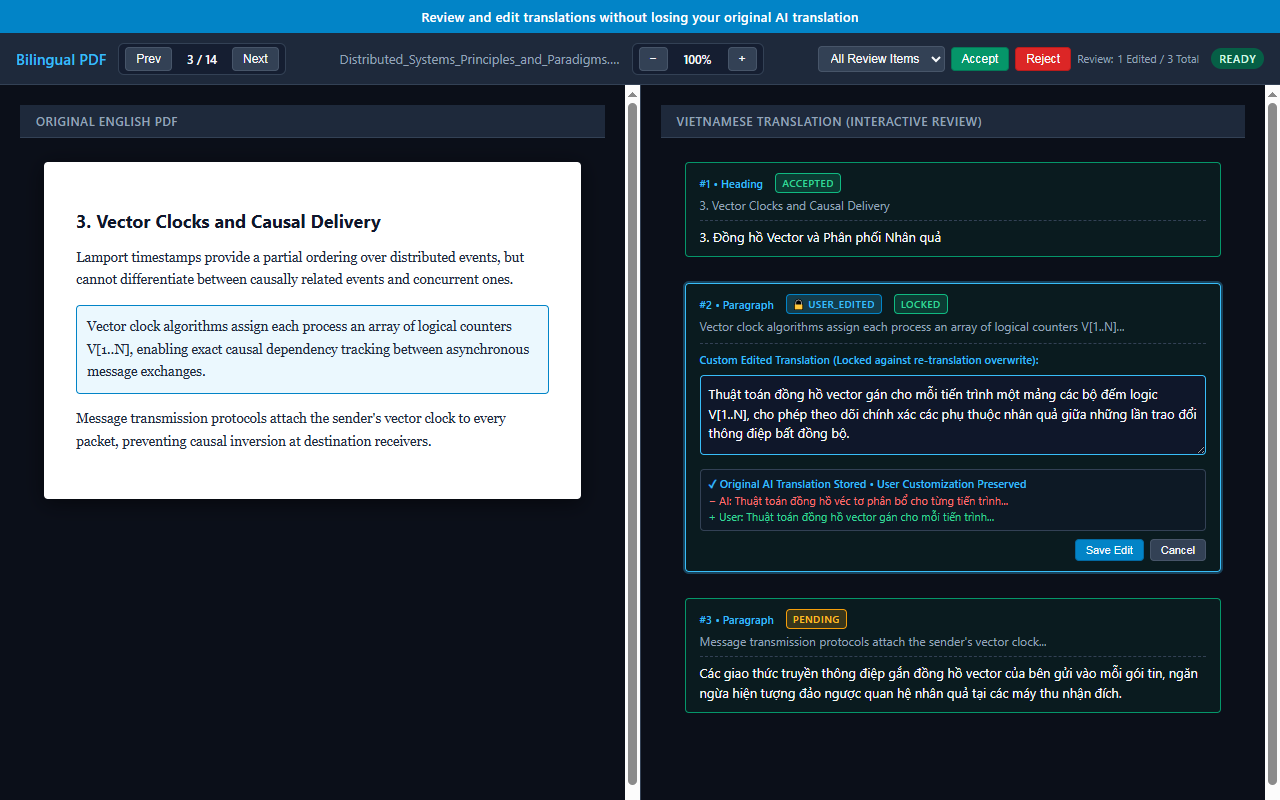
Using a synchronized dual-pane viewer, the extension displays the original English PDF side-by-side with translated Vietnamese text blocks, maintaining paragraph boundaries, headings, formulas, and references.
### Key Features
1. Synchronized Dual-Pane Viewer
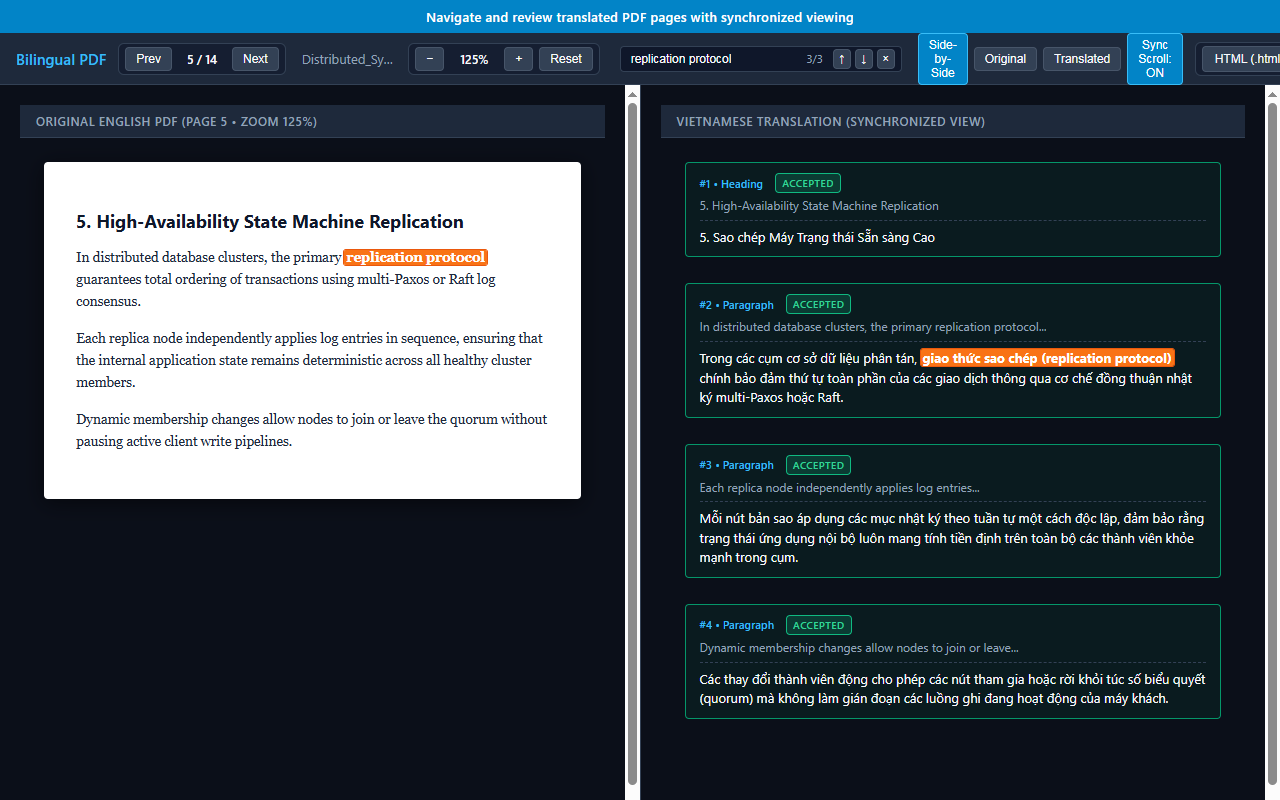
Read original English PDF pages side-by-side with aligned Vietnamese translations. Features synchronized scrolling, block highlighting, zoom controls, and multi-mode views (Side-by-Side, Original Only, Translated Only).
2. Layout & Structure Preservation
Segments text blocks and paragraphs with PDF.js while maintaining 1:1 bidirectional mapping between source and translated blocks.
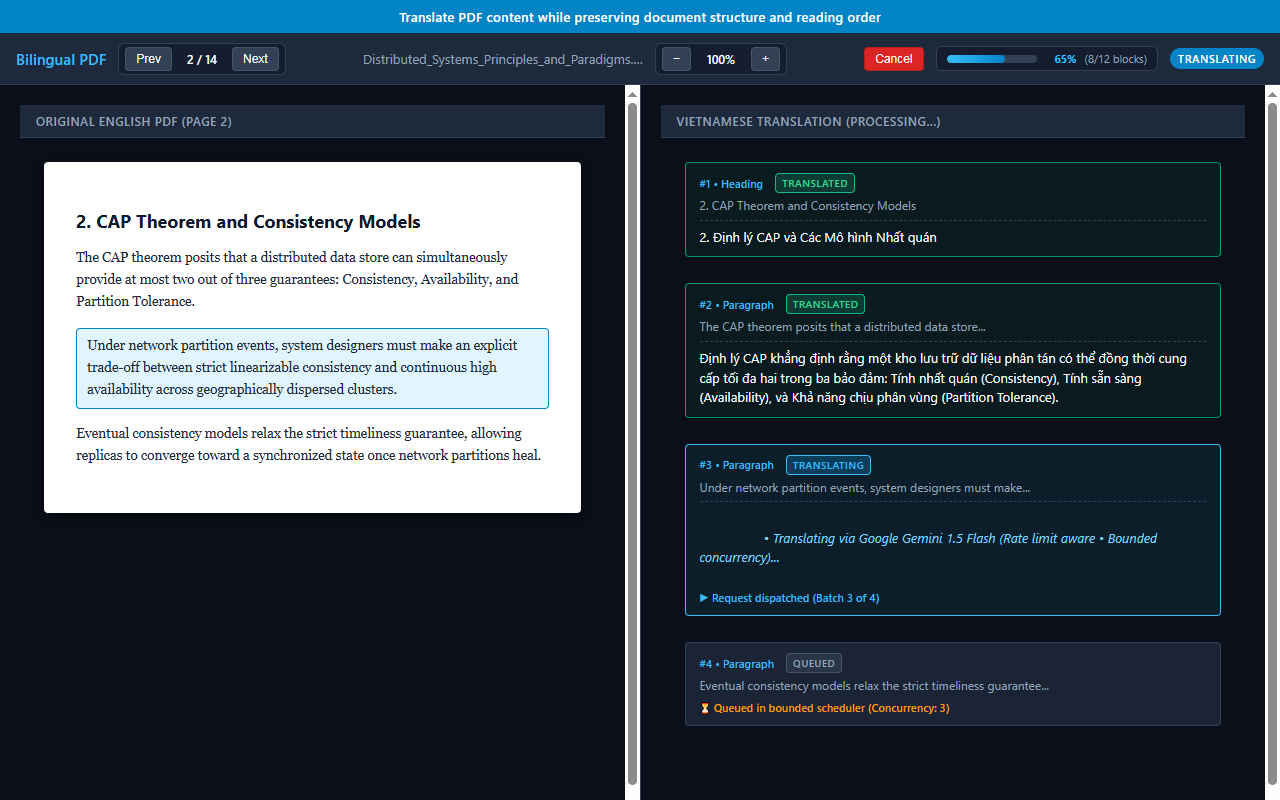
3. AI Translation via Google Gemini
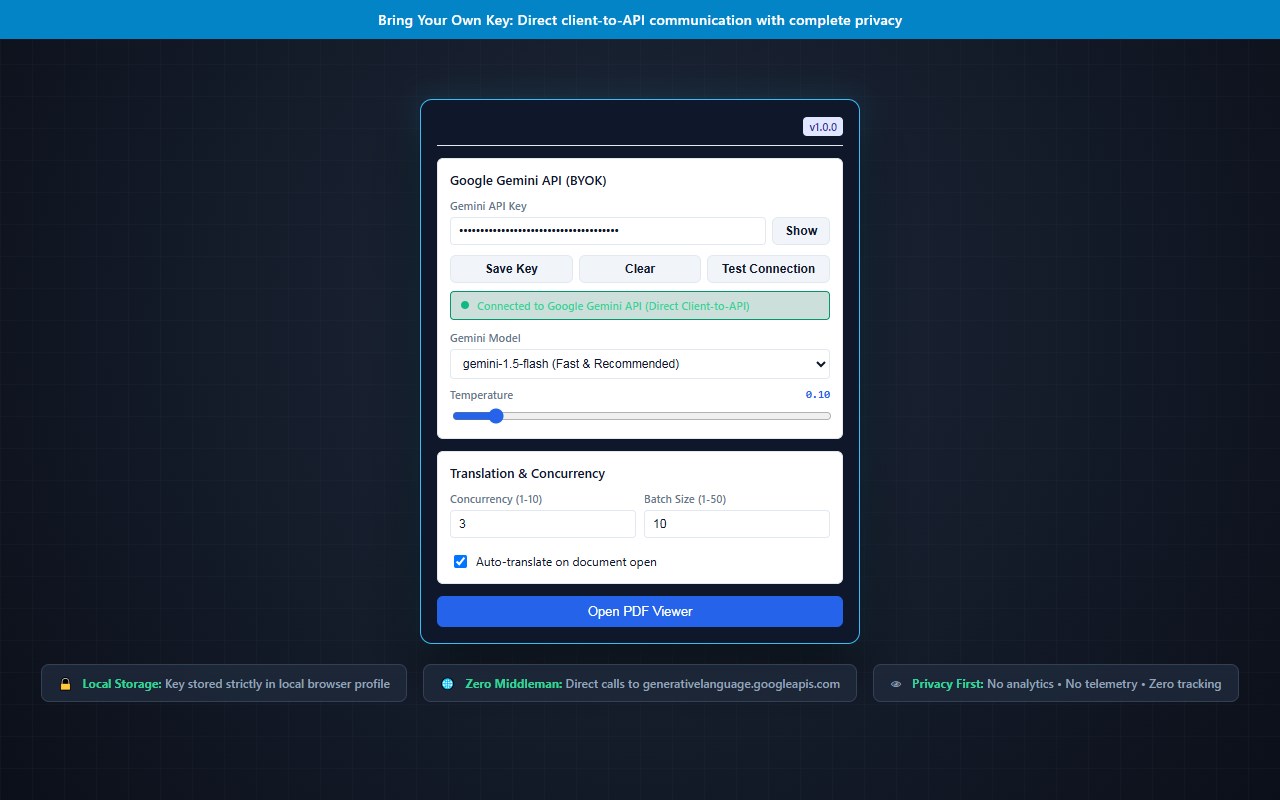
Connect directly to Google Gemini models (Gemini 1.5 Flash, Gemini 1.5 Pro, Gemini 2.0 Flash) using your own API key.
4. Invariant Preservation
Numbers, units, mathematical formulas, URLs, and code snippets remain preserved verbatim.
5. Interactive Review & USER_EDITED Protection
Edit any translation in-place. Manually edited translations are permanently locked and protected against accidental overwrites by automatic re-translations or batch retries.
6. Local Persistence & Session Restore
Saves document structures, translations, and custom edits locally using IndexedDB and chrome.storage.local. Reopening tabs restores your work instantly.
7. Full Concurrency & Rate Limit Management
Configurable bounded concurrency (1–10 requests) with exponential backoff and instant cancellation.
8. Bring Your Own Key (BYOK)
Zero subscription fees and zero developer middleman servers. All translation requests travel directly from your browser to Google's official Gemini endpoint.
---
### How It Works
1. Configure Your Key: Click the extension icon in Microsoft Edge and enter your Google Gemini API key.
2. Open a PDF: Open any online PDF document in Edge or upload a local PDF file into the viewer.
3. Translate: Click Translate Page to translate the visible page or Translate Doc for the entire document.
4. Read & Compare: Scroll through the document with synchronized dual-pane alignment.
5. Review & Custom Edit: Click on any translated block to edit text, mark items as Accepted/Rejected, and export your bilingual session to HTML, Markdown, Plain Text, or JSON.
---
### Privacy & Bring Your Own Key (BYOK)
- Zero Telemetry: No tracking scripts, analytics libraries, or telemetry collection.
- Local Storage: Your Gemini API key and translation data are stored exclusively in your local browser profile.
- Direct Transmission: Text content is transmitted over secure HTTPS directly to Google Gemini API (generativelanguage.googleapis.com). No third-party proxy or developer relay is used.
---
### Limitations & Considerations
- Scanned documents or image-only PDFs without an embedded OCR text layer cannot be parsed directly.
- Requires a valid Google Gemini API key obtained from Google AI Studio.
Bilingual PDF Translator 是做什么的
Bilingual PDF Translator 是一款面向 Edge 的效率工具类扩展,主要用来管住注意力、屏蔽干扰站点、记录时间。官方对它的介绍是:Chrome & Edge Extension for reading, layout extraction, and bilingual translation of PDF documents.在微软 Edge 加载项商店上,它当前版本 1.0.0,约 5 名用户。
适合什么人用
从功能定位看,Bilingual PDF Translator 更适合想专注工作学习、减少无效刷网页的用户。如果你平时只是偶尔遇到相关需求,用浏览器自带功能也能凑合;但如果这件事每天都发生,装一个专门处理它的扩展通常比手动操作省事得多。
怎么安装 Bilingual PDF Translator
- 打开微软 Edge 加载项商店上的官方页面;
- 点「添加到浏览器」并确认权限提示;
- 装好后在扩展列表里固定图标,方便随时开关。
本站只做索引与介绍,安装包来自官方商店。如果商店页面提示当前地区不可用,说明该扩展未在你所在区域上架。
常见问题
Bilingual PDF Translator 是免费的吗?
Bilingual PDF Translator 在微软 Edge 加载项商店免费提供下载。它是浏览器扩展,装上就能直接用,不需要注册账号。
Bilingual PDF Translator 安全吗?
它只申请了 0 项权限,范围比较克制,没有申请「读取所有网站数据」这种大权限。
Bilingual PDF Translator 支持哪些浏览器?
当前收录的版本来自微软 Edge 加载项商店,适用于 Edge。同一个扩展在其他商店可能有对应版本,但功能与版本号不一定相同。
怎么卸载 Bilingual PDF Translator?
在扩展管理页找到 Bilingual PDF Translator,点移除即可。它在本地保存的设置会一起清掉,不会残留数据。
权限清单 来自 manifest.json 原文
接口权限 2
activeTabstorage