
Batch Image Processor EN
JiangMi Travel · EEdge MV3
Professional batch image processing: compress, resize, convert formats. Privacy-first local processing. Grab images from any page.
截图


简介
Batch Image Processor is a powerful, privacy-first tool for professional image processing right in your browser. Perfect for photographers, web developers, content creators, and anyone who works with images regularly.
🌟 Key Features
Batch Processing Made Easy
• Process multiple images simultaneously
• Drag & drop or select files from your computer
• Collect images from any webpage with right-click menu
• Multi-tab collection: gather images from different tabs into one queue
Privacy-Focused Design
• 100% local processing - your images NEVER leave your device
• No uploads to servers
• No tracking or analytics
• All processing happens in your browser using JavaScript
Powerful Image Tools
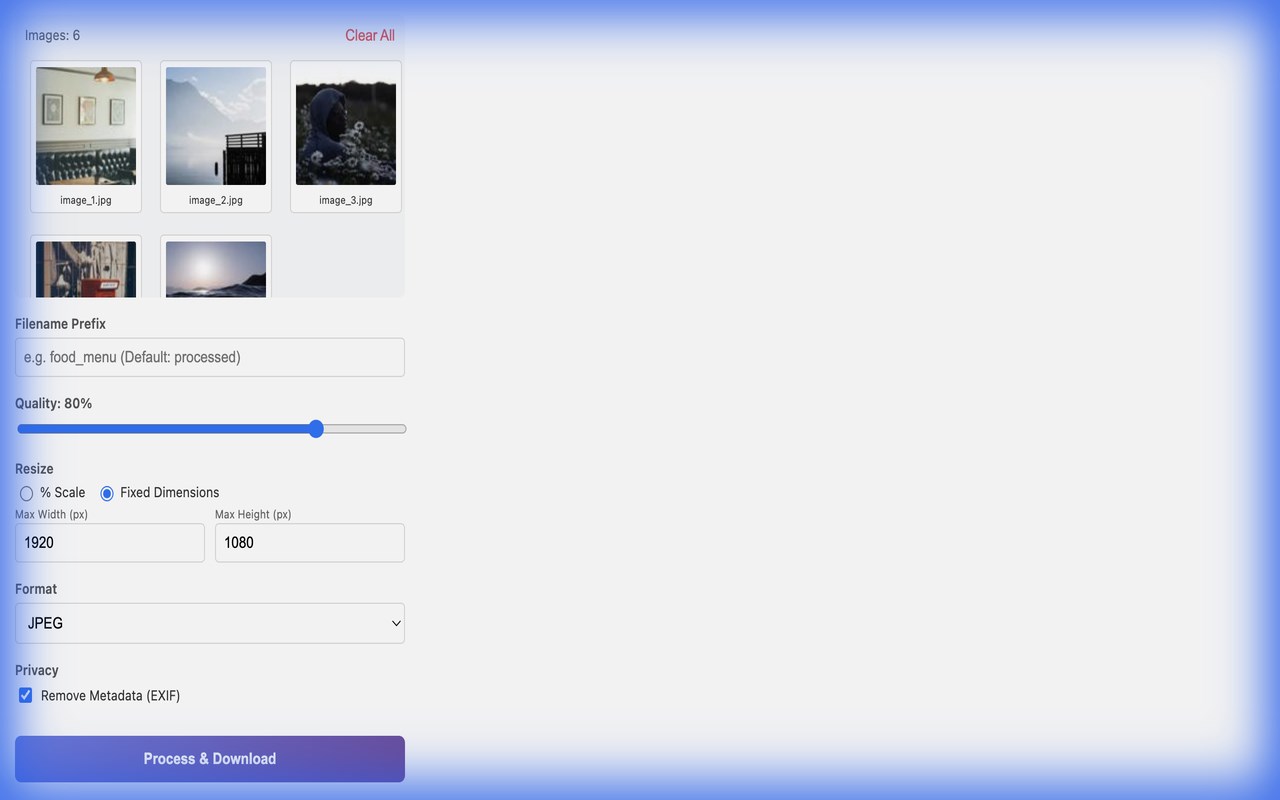
• Smart Resizing: Scale by percentage or set fixed width (height auto-calculated)
• Format Conversion: Convert to JPEG, PNG, or WebP
• Quality Control: Adjust compression from 1-100%
• Metadata Removal: Strip EXIF data for privacy
• Flexible Naming: Custom prefix, suffix, or sequential numbering
• Download Options: Individual files or ZIP archive
Built-in Editor
• Crop images (Square or 4:3 ratio)
• Rotate images before processing
• Real-time preview
One-Click Presets
• Social Media (1080p)
• Web Optimization (WebP)
• Print Quality
🎯 Perfect For
• Food Bloggers & Restaurants: Optimize menu photos (developed by Beijing Food Menu team)
• Web Developers: Batch convert images to WebP for faster websites
• Photographers: Quick batch resizing and format conversion
• Content Creators: Prepare images for social media
• E-commerce: Optimize product photos
🔒 Privacy & Security
We take your privacy seriously:
• All image processing happens locally in your browser
• No data is uploaded to our servers or any third-party services
• No cookies, no tracking, no analytics
• Open source MIT license - you can verify the code yourself
🚀 How to Use
1. Click the extension icon to open the processor
2. Upload images by:
- Dragging & dropping files
- Clicking to select files
- Right-clicking on any webpage and selecting "Process All Images on Page"
3. Adjust settings (quality, size, format, naming)
4. Click "Process & Download" to get your optimized images
🛠️ Technical Details
• Input Formats: JPEG, PNG, WebP, BMP, GIF
• Output Formats: JPEG, PNG, WebP
• Tech Stack: Pure HTML/CSS/JavaScript (only dependency: JSZip for ZIP creation)
• Manifest V3: Latest browser extension standard
• No External Dependencies: All processing is done locally
💡 Why Choose Batch Image Processor?
Unlike online image processors that upload your photos to their servers, our extension keeps everything local. This means:
✅ Faster processing (no upload/download time)
✅ Complete privacy (your images never leave your device)
✅ Works offline
✅ No file size limits
✅ No watermarks or restrictions
🏢 About
Developed by the Beijing Food Menu team. We originally built this tool to optimize thousands of culinary photos on our website. After seeing how much it improved our workflow, we decided to open-source it and make it available to everyone.
📞 Support & Feedback
• GitHub: https://github.com/jiangmitravel/beijingfoodmenu-image-tools
• Website: https://jiangmitravel.github.io/beijingfoodmenu-image-tools/
• Issues & Feature Requests: GitHub Issues
📄 License
MIT License - Free and open source
Note: This extension requires permissions to access images on web pages (for the "Process All Images" feature) and to download processed files to your computer. All processing is done locally - no data is transmitted.
Batch Image Processor 是做什么的
Batch Image Processor 是一款面向 Edge 的效率工具类扩展,主要用来管住注意力、屏蔽干扰站点、记录时间。官方对它的介绍是:Professional batch image processing: compress, resize, convert formats. Privacy-first local processing. Grab images from any page.在微软 Edge 加载项商店上,它当前版本 1.0.0,约 2 名用户。
适合什么人用
从功能定位看,Batch Image Processor 更适合想专注工作学习、减少无效刷网页的用户。如果你平时只是偶尔遇到相关需求,用浏览器自带功能也能凑合;但如果这件事每天都发生,装一个专门处理它的扩展通常比手动操作省事得多。
怎么安装 Batch Image Processor
- 打开微软 Edge 加载项商店上的官方页面;
- 点「添加到浏览器」并确认权限提示;
- 装好后在扩展列表里固定图标,方便随时开关。
本站只做索引与介绍,安装包来自官方商店。如果商店页面提示当前地区不可用,说明该扩展未在你所在区域上架。
常见问题
Batch Image Processor 是免费的吗?
Batch Image Processor 在微软 Edge 加载项商店免费提供下载。它是浏览器扩展,装上就能直接用,不需要注册账号。
Batch Image Processor 安全吗?
它只申请了 0 项权限,范围比较克制,没有申请「读取所有网站数据」这种大权限。
Batch Image Processor 支持哪些浏览器?
当前收录的版本来自微软 Edge 加载项商店,适用于 Edge。同一个扩展在其他商店可能有对应版本,但功能与版本号不一定相同。
怎么卸载 Batch Image Processor?
在扩展管理页找到 Batch Image Processor,点移除即可。它在本地保存的设置会一起清掉,不会残留数据。
权限清单 来自 manifest.json 原文
接口权限 5
activeTabcontextMenusdownloadsscriptingstorage