
Auto-Saksasta Tuontihintabotti EN
Abco Oy · EEdge MV3
Analyse a car listing in one click and open the import price calculator pre-filled.
<all_urls>),意味着它可以读取你在任意站点的页面内容,包括已登录的页面。这是许多扩展正常工作的必要条件,但也值得你确认来源可信。
截图
简介
Tuontihintabotti is an intelligent browser extension specifically crafted to simplify the often complex process of importing cars into Finland. It functions as a comprehensive assistant for calculating import car taxes and other associated import costs in just a few seconds, making the experience smooth, reliable, and accessible directly from your web browser. By leveraging cutting-edge artificial intelligence combined with seamless integration to the popular Finnish automotive service auto-saksasta.fi, Tuontihintabotti automates the extraction and analysis of vehicle data from virtually any car listing webpage. This sophisticated tool provides accurate, up-to-date calculations based on official Finnish tax decisions, including customs fees, vehicle taxes, and other fees relevant to importing cars into Finland. Whether you are a casual buyer browsing through international car listings or a serious importer preparing for taxation, the extension empowers you with instant, detailed cost estimates that remove the hassle of manual calculations and the need for navigating complex government calculators.
The extension’s AI-driven backend powered by Claude AI technology intelligently identifies crucial information such as the car’s price, model, specifications, and market context. It cross-references these details against actual Finnish car tax laws and past tax decision histories to deliver a highly accurate personalized estimate of all expected import costs. Designed with simplicity and user convenience in mind, Tuontihintabotti automatically detects relevant car information on the current page and provides this data in a clear, concise popup window. From there, you can review import taxes and fees or export the results to the auto-saksasta.fi import calculator for further planning and comparisons. The extension recognizes whether you are logged into auto-saksasta.fi, adapting its features accordingly to provide enhanced functionality—such as easier tracking of your compared vehicles and improved session management—without requiring manual authentication or API keys.
Tuontihintabotti also solves common technical challenges such as Cross-Origin Resource Sharing (CORS) limitations and image extraction, enabling it to fetch and process vehicle details from a wide range of foreign car marketplaces and listing platforms seamlessly. Its interface is minimalistic yet user-friendly, offering clear instructions and quick feedback through status banners and notifications. With Finnish language support, the extension fits naturally within the local user environment. Installation is straightforward, requiring no complex configuration, allowing users to get started within moments.
Key Features:
- Advanced AI-powered extraction of car details—including price, make, model, and features—from nearly any online car listing page.
- Automated calculation of Finnish car tax, customs duties, and related import fees, grounded in official Finnish taxation decisions and history.
- Smooth integration with auto-saksasta.fi for instantaneous cost analysis and direct export to fully pre-filled import calculators.
- Intelligent session detection that adapts functionality for logged-in users, providing personalized tools for vehicle tracking and comparison.
- Robust handling of CORS restrictions and vehicle image extraction to enable comprehensive data gathering across diverse foreign marketplaces.
- Clean and clear popup interface with Finnish language support, featuring actionable buttons, status messages, and straightforward instructions.
- Capability to open detailed import calculator results in a new browser tab for convenient further analysis and planning.
How It Works:
1. Install the Tuontihintabotti extension from your browser’s extension store.
2. Visit a foreign car marketplace or the auto-saksasta.fi site to browse car listings.
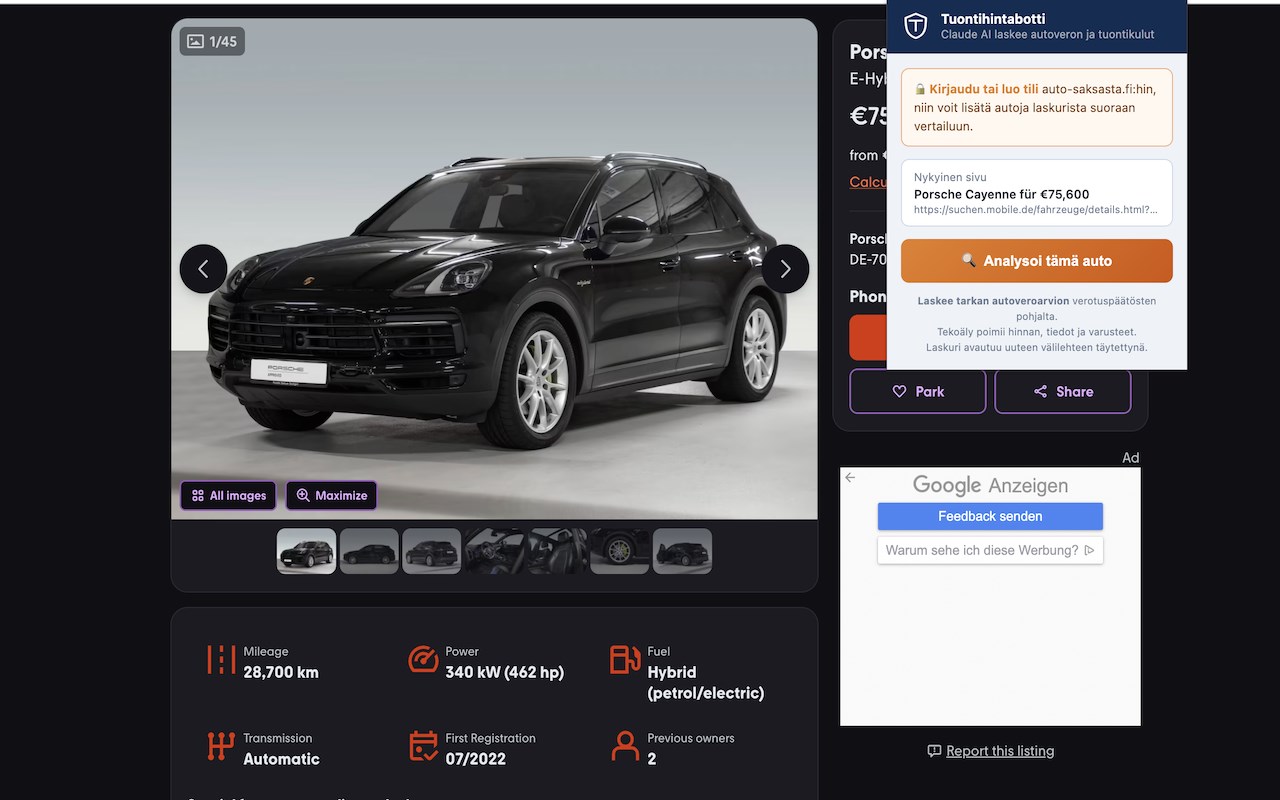
3. Open the extension popup, which automatically detects and collects the car’s relevant data from the current page.
4. Click “Analysoi tämä auto” (“Analyze this car”) to trigger the AI-powered extraction and calculation process.
5. The extension extracts the car’s price and features, cross-checking them with Finland’s official car tax decisions and import regulations.
6. Estimated import taxes and fees are calculated and presented clearly within the popup interface.
7. Optionally, the calculated data is transferred to the auto-saksasta.fi import calculator in a new tab for more detailed review or comparison.
8. If logged into auto-saksasta.fi, the extension provides session-aware features such as saving comparisons and displaying personalized tracking tools.
9. Throughout the process, you receive real-time feedback and status messages ensuring transparency and guiding you through any issues.
Privacy: - No personal data collected. The extension operates exclusively within the context of your browser session for auto-saksasta.fi authentication and does not transfer or store any personal or identifiable information beyond what is necessary for the analysis and session handling. For detailed privacy information, please refer to the extension’s privacy policy.
Auto-Saksasta Tuontihintabotti 是做什么的
Auto-Saksasta Tuontihintabotti 是一款面向 Edge 的购物比价类扩展,主要用来比价、查历史价格、自动套用优惠券、返现。官方对它的介绍是:Analyse a car listing in one click and open the import price calculator pre-filled.在微软 Edge 加载项商店上,它当前版本 2.8。
适合什么人用
从功能定位看,Auto-Saksasta Tuontihintabotti 更适合经常网购、想在下单前确认是否真便宜的用户。如果你平时只是偶尔遇到相关需求,用浏览器自带功能也能凑合;但如果这件事每天都发生,装一个专门处理它的扩展通常比手动操作省事得多。需要注意的是它作用于所有网站,装上后建议先观察一两天,确认不影响常用站点的正常使用。
怎么安装 Auto-Saksasta Tuontihintabotti
- 打开微软 Edge 加载项商店上的官方页面;
- 点「添加到浏览器」并确认权限提示;
- 装好后在扩展列表里固定图标,方便随时开关。
本站只做索引与介绍,安装包来自官方商店。如果商店页面提示当前地区不可用,说明该扩展未在你所在区域上架。
常见问题
Auto-Saksasta Tuontihintabotti 是免费的吗?
Auto-Saksasta Tuontihintabotti 在微软 Edge 加载项商店免费提供下载。它是浏览器扩展,装上就能直接用,不需要注册账号。
Auto-Saksasta Tuontihintabotti 安全吗?
它只申请了 0 项权限,范围比较克制,没有申请「读取所有网站数据」这种大权限。
Auto-Saksasta Tuontihintabotti 支持哪些浏览器?
当前收录的版本来自微软 Edge 加载项商店,适用于 Edge。同一个扩展在其他商店可能有对应版本,但功能与版本号不一定相同。
怎么卸载 Auto-Saksasta Tuontihintabotti?
在扩展管理页找到 Auto-Saksasta Tuontihintabotti,点移除即可。它在本地保存的设置会一起清掉,不会残留数据。
权限清单 来自 manifest.json 原文
站点访问(可选) 2
http://*/*https://*/*
接口权限 4
activeTabscriptingstoragetabs