Auto Refresh Tab EN
Leonhard Steinkogler · EEdge MV3
Auto Refresh Tab – Effortless Website Auto-Reload Management Auto Refresh Tab is a straightforward yet powerful browser extension designed to automate the process of reloading webpages at user-defined intervals. Ideal for anyone who needs to keep track of live data, refresh dashboards, monitor ticket systems, or catch real-time news updates without the burden of manually clicking the refresh butt
截图
简介
Auto Refresh Tab – Effortless Website Auto-Reload Management
Auto Refresh Tab is a straightforward yet powerful browser extension designed to automate the process of reloading webpages at user-defined intervals. Ideal for anyone who needs to keep track of live data, refresh dashboards, monitor ticket systems, or catch real-time news updates without the burden of manually clicking the refresh button, this extension makes the task seamless and efficient. With a clean, lightweight interface and intuitive controls, Auto Refresh Tab empowers users to set custom refresh intervals in seconds, ensuring that the content on any selected browser tab stays current with minimal effort.
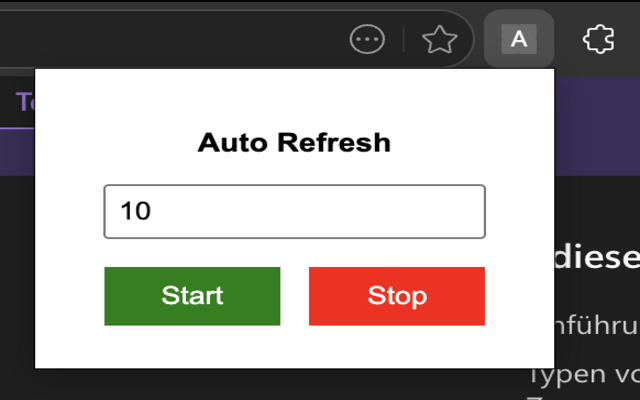
Upon installation, Auto Refresh Tab integrates smoothly with your browser, adding a convenient icon that gives you fast access to its core features through a popup interface as well as a context menu option. You can easily enter the desired refresh interval, start or stop the auto-refresh process at any moment, and configure it specifically for individual websites or tabs. The extension also supports multi-tab management, allowing simultaneous auto-refresh operations across different tabs or domains. Settings are saved locally on your device, respecting user privacy by avoiding any external data transfer or cloud synchronization.
The extension’s background service worker efficiently manages timing tasks behind the scenes, handling multiple refresh jobs in parallel while associating them with their respective tabs or website origins. This ensures stable performance and prevents unwanted refreshes. The user interface is designed for simplicity and speed, featuring an input field where you specify the interval in seconds, buttons to toggle the refresh function, and a live countdown displayed as a badge on the extension’s icon, keeping you informed at a glance even when the popup is closed.
Auto Refresh Tab distinguishes itself through its privacy-conscious approach: it requires only minimal permissions, does not track user activity, and stores all configurations exclusively within the browser’s local storage. Whether you’re monitoring flash sales, following live sports scores, or maintaining session activity on websites that time out, this extension provides a reliable and hassle-free solution to keep your tabs refreshed automatically.
Key Features:
- Customizable auto-refresh intervals: Set your preferred reload time in seconds tailored to your needs.
- Live countdown badge: Visual timer displayed on the extension icon to track remaining time before refresh.
- Simple start/stop control: One-click toggling to begin or halt auto-refresh on any tab.
- Context menu integration: Right-click to quickly apply auto-refresh to the selected website or tab.
- Multi-tab and multi-site support: Manage several auto-refresh jobs simultaneously without conflict.
- Lightweight and minimal interface: Designed for quick access and low resource consumption.
- Privacy-first design: Stores settings locally with no tracking, no ads, and no unnecessary permissions.
How It Works:
1. Install the extension from the browser’s store with no complicated setup needed.
2. Click the Auto Refresh Tab icon in the toolbar to open the popup interface.
3. Enter the desired refresh interval (in seconds) into the input field.
4. Press the “Start” button to activate automatic refreshing for the current tab.
5. Optionally, right-click the extension icon to specify a particular website or tab to auto-refresh.
6. Monitor the live countdown badge on the icon showing time left until the next reload.
7. Click “Stop” whenever you want to pause or end the auto-refresh process.
Privacy: - No personal data collected.
Auto Refresh Tab 是做什么的
Auto Refresh Tab 是一款面向 Edge 的效率工具类扩展,主要用来管住注意力、屏蔽干扰站点、记录时间。官方对它的介绍是:Auto Refresh Tab – Effortless Website Auto-Reload Management Auto Refresh Tab is a straightforward yet powerful browser extension designed to automate the process of reloading webpages at user-defined intervals. Ideal for anyone who needs to keep track of live data, refresh dashboards, monitor ticket systems, or catch real-time news updates without the burden of manually clicking the refresh butt在微软 Edge 加载项商店上,它当前版本 1.0.0,约 42 名用户。
适合什么人用
从功能定位看,Auto Refresh Tab 更适合想专注工作学习、减少无效刷网页的用户。如果你平时只是偶尔遇到相关需求,用浏览器自带功能也能凑合;但如果这件事每天都发生,装一个专门处理它的扩展通常比手动操作省事得多。
怎么安装 Auto Refresh Tab
- 打开微软 Edge 加载项商店上的官方页面;
- 点「添加到浏览器」并确认权限提示;
- 装好后在扩展列表里固定图标,方便随时开关。
本站只做索引与介绍,安装包来自官方商店。如果商店页面提示当前地区不可用,说明该扩展未在你所在区域上架。
常见问题
Auto Refresh Tab 是免费的吗?
Auto Refresh Tab 在微软 Edge 加载项商店免费提供下载。它是浏览器扩展,装上就能直接用,不需要注册账号。
Auto Refresh Tab 安全吗?
它只申请了 0 项权限,范围比较克制,没有申请「读取所有网站数据」这种大权限。
Auto Refresh Tab 支持哪些浏览器?
当前收录的版本来自微软 Edge 加载项商店,适用于 Edge。同一个扩展在其他商店可能有对应版本,但功能与版本号不一定相同。
怎么卸载 Auto Refresh Tab?
在扩展管理页找到 Auto Refresh Tab,点移除即可。它在本地保存的设置会一起清掉,不会残留数据。
权限清单 来自 manifest.json 原文
接口权限 3
contextMenusstoragetabs
其他商店也有这款
同一款扩展在不同浏览器下的版本,权限与更新节奏可能不同
