Auto Refresh Pro — Modern Auto-Refresher EN
Mukesh Kumar Makwana · EEdge MV3
Modern auto refresh with beautiful UI. Popup, settings, side panel, smart scheduling, stats, notifications & 100+ pro features.
<all_urls>),意味着它可以读取你在任意站点的页面内容,包括已登录的页面。这是许多扩展正常工作的必要条件,但也值得你确认来源可信。
截图
简介
# 🔄 Auto Refresh Pro
A modern, beautiful auto-refresh extension for **Chrome (Manifest V3)** with a
popup, a full-page settings dashboard, a side-panel control center and **100+ features**.

---
## ✨ Highlights
- **Per-tab auto refresh** — start/stop/refresh-now from the popup, side panel,
right-click menu, or keyboard (`Alt+R`).
- **Modern UI everywhere** — glassmorphism, 6 themes, accent color picker,
compact mode, animations.
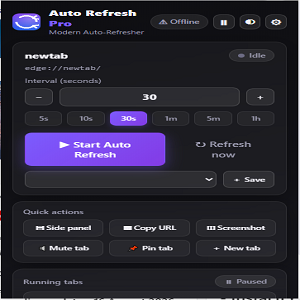
- **Popup** — interval stepper, presets (5s→1h), live countdown, progress bar,
session stats, quick actions (copy URL, screenshot, mute, pin…).
- **Side panel** — live dashboard: stats, 24h activity chart, per-tab table
with search, bulk start/stop/refresh, URL manager, refresh history log
(export as JSON), schedule editor.
- **Full-page settings** — 11 tabs covering scheduling, rules engine,
notifications, sounds, badge, after-refresh actions, appearance, advanced.
- **Intelligent scheduling** — time window, days-of-week, overnight windows.
- **Rules engine** — allow/block patterns with wildcards.
- **Smart behaviour** — auto-stop on keyword/title, auto-click selector,
auto-scroll, custom JS after every load, offline-aware, active-tab-only,
randomized intervals, hard reload (bypass cache), error-page auto-reload.
- **100% local & private** — no servers, no tracking.
See **[FEATURES.md](FEATURES.md)** for the complete numbered list.
---
## 📦 Install (Developer Mode)
1. Make sure the `auto-refresh-pro` folder is on your disk (it already is).
2. Open Chrome and go to `chrome://extensions`.
3. Enable **Developer mode** (toggle, top-right).
4. Click **Load unpacked** → select the **`auto-refresh-pro`** folder.
5. Pin the extension for easy access.
That's it — you're running.
---
## ⌨️ Keyboard shortcuts
| Action | Keys |
| --------------------------------------- | --------------- |
| Toggle auto refresh on the current tab | `Alt + R` |
| Refresh current tab now | `Alt + Shift + R` |
Customize them at `chrome://extensions/shortcuts`.
---
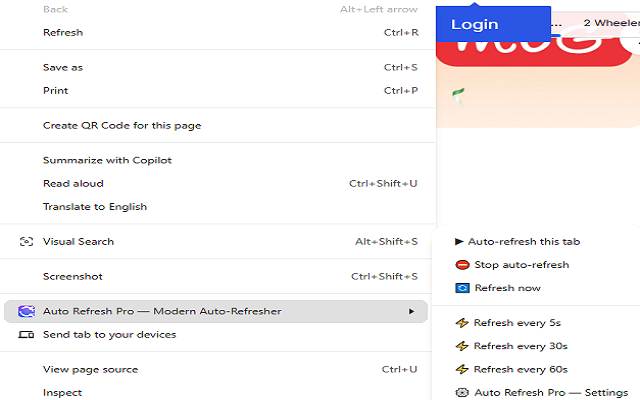
## 🖱 Right-click quick menu
- **Auto-refresh this tab**
- **Stop auto-refresh**
- **Refresh now**
- Fast presets: **every 5s / 30s / 60s**
- **Open Auto Refresh Pro — Settings**
---
## 🗂 Project layout
```
auto-refresh-pro/
├─ manifest.json # MV3 manifest (side panel, permissions, commands)
├─ background.js # Service worker: refresh engine, scheduler, badge,
│ # notifications, context menus, message hub
├─ lib/common.js # Shared library (storage, rules, schedule, helpers)
├─ content/content.js # In-page actions (auto-click, scroll, script, errors)
├─ popup/ # Popup UI (HTML/CSS/JS)
├─ sidepanel/ # Side-panel control center (HTML/CSS/JS)
├─ settings/ # Full-page settings dashboard (HTML/CSS/JS)
├─ assets/ui.css # Shared modern design system
├─ assets/icons/ # Generated brand icons (16–128 px)
└─ FEATURES.md # 100+ feature list
```
---
## 🧪 Tests
Core logic (rules, scheduling, formatting, storage round-trip) is covered by
`test_logic.js` — run with `node test_logic.js` (32 assertions).
---
## 💡 Tips
- Use **hard reload** for pages that cache aggressively.
- Use the **rules engine** to block refresh on pages that must not reload.
- **Randomize interval** to look more human on live-tracking sites.
- Set an **auto-stop keyword** (e.g. "In Stock") to stop when the page changes.
- Check the **logo badge** — it shows a live countdown per refreshing tab.
Auto Refresh Pro — Modern Auto-Refresher 是做什么的
Auto Refresh Pro — Modern Auto-Refresher 是一款面向 Edge 的效率工具类扩展,主要用来管住注意力、屏蔽干扰站点、记录时间。官方对它的介绍是:Modern auto refresh with beautiful UI. Popup, settings, side panel, smart scheduling, stats, notifications & 100+ pro features.在微软 Edge 加载项商店上,它当前版本 1.0.0,约 2 名用户。
适合什么人用
从功能定位看,Auto Refresh Pro — Modern Auto-Refresher 更适合想专注工作学习、减少无效刷网页的用户。如果你平时只是偶尔遇到相关需求,用浏览器自带功能也能凑合;但如果这件事每天都发生,装一个专门处理它的扩展通常比手动操作省事得多。需要注意的是它作用于所有网站,装上后建议先观察一两天,确认不影响常用站点的正常使用。
怎么安装 Auto Refresh Pro — Modern Auto-Refresher
- 打开微软 Edge 加载项商店上的官方页面;
- 点「添加到浏览器」并确认权限提示;
- 装好后在扩展列表里固定图标,方便随时开关。
本站只做索引与介绍,安装包来自官方商店。如果商店页面提示当前地区不可用,说明该扩展未在你所在区域上架。
常见问题
Auto Refresh Pro — Modern Auto-Refresher 是免费的吗?
Auto Refresh Pro — Modern Auto-Refresher 在微软 Edge 加载项商店免费提供下载。它是浏览器扩展,装上就能直接用,不需要注册账号。
Auto Refresh Pro — Modern Auto-Refresher 安全吗?
它只申请了 0 项权限,范围比较克制,没有申请「读取所有网站数据」这种大权限。
Auto Refresh Pro — Modern Auto-Refresher 支持哪些浏览器?
当前收录的版本来自微软 Edge 加载项商店,适用于 Edge。同一个扩展在其他商店可能有对应版本,但功能与版本号不一定相同。
怎么卸载 Auto Refresh Pro — Modern Auto-Refresher?
在扩展管理页找到 Auto Refresh Pro — Modern Auto-Refresher,点移除即可。它在本地保存的设置会一起清掉,不会残留数据。
权限清单 来自 manifest.json 原文
站点访问(可选) 1
<all_urls>
接口权限 8
activeTabalarmscontextMenusnotificationsscriptingsidePanelstoragetabs