
Auto Refresh Pro EN
RofiqFM15 · EEdge MV3
Auto refresh modern dengan Halaman Options dan Tab Monitor.
<all_urls>),意味着它可以读取你在任意站点的页面内容,包括已登录的页面。这是许多扩展正常工作的必要条件,但也值得你确认来源可信。
截图


简介
Auto Refresh Pro: The Elegant Web Monitoring Solution
Upgrade your browsing experience with Auto Refresh Pro, the most sophisticated and reliable auto-refresh extension designed for modern professionals. Whether you are monitoring dynamic data, hunting for limited tickets, or waiting for critical updates, Auto Refresh Pro handles it all seamlessly in the background.
Designed with precision and user comfort in mind, this extension goes beyond simple page reloading. It features a robust "Smart Sensor" that accurately detects genuine web changes and eliminates false alarms, ensuring your workflow remains uninterrupted.
✨ Premium Features:
🧠 Smart Change Detection: Our advanced algorithm waits for the page to fully load before taking a data snapshot. It intelligently differentiates between your manual data inputs and actual server-side updates, ensuring you only get notified when it truly matters.
🎯 Keyword & XPath Targeting: Tell the extension exactly what to look for. The refresh loop will stop instantly the moment a specific keyword, phrase, or XPath element appears on the screen.
🔔 Custom Audio & Desktop Alerts: Never miss an update! Choose from a curated list of built-in notification sounds or paste your own custom MP3 URL. Coupled with instant desktop pop-ups, you will be alerted immediately—even if you are working in another application.
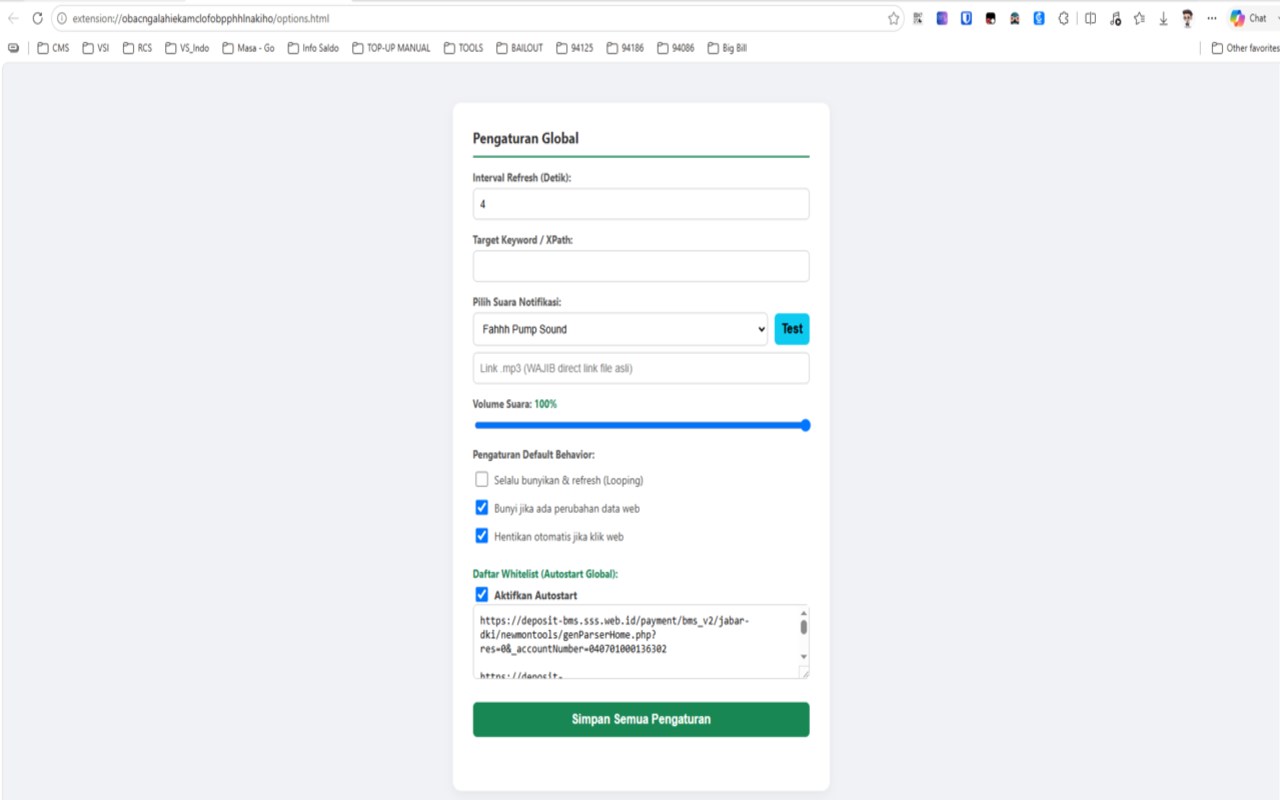
⚡ Global Autostart (Whitelist): Automate your daily routine. Define specific URLs or domain keywords in the Options page, and the extension will automatically trigger the monitoring process the moment you visit those sites.
👁️ Eye-Friendly Visual Timer: Say goodbye to harsh colors and eye strain. The on-screen countdown timer features an elegant, soothing Emerald Green UI with bold white text, specifically designed for maximum visual comfort during long monitoring sessions.
📊 Live Tab Monitoring: Keep everything under control. Easily track which tabs are currently running the auto-refresh script directly from the minimalist popup menu.
⚙️ Dedicated Options Page: Keep your daily popup menu clean and clutter-free. All advanced configurations—such as audio selection, default behaviors, and whitelist management—are neatly organized in a dedicated settings page.
Perfect For:
Monitoring live data dashboards, banking portals, or internal company systems.
Tracking product availability, restocks, and flash sales.
Waiting for limited ticket releases.
Automating any repetitive web monitoring tasks without the need to stare at the screen.
Work smarter, not harder. Let Auto Refresh Pro do the watching for you!
Auto Refresh Pro 是做什么的
Auto Refresh Pro 是一款面向 Edge 的效率工具类扩展,主要用来管住注意力、屏蔽干扰站点、记录时间。官方对它的介绍是:Auto refresh modern dengan Halaman Options dan Tab Monitor.在微软 Edge 加载项商店上,它当前版本 1.2,约 15 名用户。
适合什么人用
从功能定位看,Auto Refresh Pro 更适合想专注工作学习、减少无效刷网页的用户。如果你平时只是偶尔遇到相关需求,用浏览器自带功能也能凑合;但如果这件事每天都发生,装一个专门处理它的扩展通常比手动操作省事得多。需要注意的是它作用于所有网站,装上后建议先观察一两天,确认不影响常用站点的正常使用。
怎么安装 Auto Refresh Pro
- 打开微软 Edge 加载项商店上的官方页面;
- 点「添加到浏览器」并确认权限提示;
- 装好后在扩展列表里固定图标,方便随时开关。
本站只做索引与介绍,安装包来自官方商店。如果商店页面提示当前地区不可用,说明该扩展未在你所在区域上架。
常见问题
Auto Refresh Pro 是免费的吗?
Auto Refresh Pro 在微软 Edge 加载项商店免费提供下载。它是浏览器扩展,装上就能直接用,不需要注册账号。
Auto Refresh Pro 安全吗?
它只申请了 0 项权限,范围比较克制,没有申请「读取所有网站数据」这种大权限。
Auto Refresh Pro 支持哪些浏览器?
当前收录的版本来自微软 Edge 加载项商店,适用于 Edge。同一个扩展在其他商店可能有对应版本,但功能与版本号不一定相同。
怎么卸载 Auto Refresh Pro?
在扩展管理页找到 Auto Refresh Pro,点移除即可。它在本地保存的设置会一起清掉,不会残留数据。
权限清单 来自 manifest.json 原文
站点访问(可选) 1
<all_urls>
接口权限 5
activeTabnotificationsscriptingstoragetabs
其他商店也有这款
同一款扩展在不同浏览器下的版本,权限与更新节奏可能不同
