
Auto Refresh Plus | Page Monitor EN
mukesh kumar makwana · EEdge MV3
Automatically refresh web pages at defined intervals with advanced page monitoring and content detection features.
<all_urls>),意味着它可以读取你在任意站点的页面内容,包括已登录的页面。这是许多扩展正常工作的必要条件,但也值得你确认来源可信。
截图



简介
Auto Refresh Plus | Page Monitor is a highly sophisticated and professional Chrome extension designed to automate the process of web page refreshing while offering advanced content monitoring and detection capabilities. Developed using Manifest V3, this feature-rich extension provides users with granular control over refreshing behavior, making it ideal for anyone who needs to stay updated with dynamic web content without the hassle of manual page reloads.
The extension supports various refreshing modes including fixed intervals, random intervals to avoid detection by anti-bot systems, and countdown timers for precise refresh scheduling. Users can easily set default time intervals from preset options or define custom durations in hours, minutes, and seconds. Auto Refresh Plus also allows setting a refresh count, including infinite refresh cycles, to tailor the browsing experience precisely. A visually intuitive and draggable timer overlay appears on pages, color-coded to indicate the status, providing live feedback on countdowns.
One of the standout features is the comprehensive page monitor, which detects keyword occurrences or content changes on the page. It supports a variety of expressions such as normal text, custom patterns, XPath, and regular expressions, allowing flexible and powerful monitoring strategies. Upon detection of specified keywords or content changes, the extension can trigger multiple actions: highlight matched content, auto-scroll the page to the changes, auto-click designated elements, bring the browser window into focus, and even stop refreshing automatically. This makes it invaluable for tracking updates on ticketing websites, auction listings, stock monitoring pages, social feeds, or news portals.
Multi-tab management is seamless, enabling users to schedule and monitor refresh activities across several tabs independently. The extension provides a popup interface accessible from the browser toolbar, which lists all active tabs with their current refresh status and timer countdowns. Users can start, stop, or update refresh operations individually or en masse, making bulk page operation and monitoring straightforward.
Notifications are highly customizable. The extension supports push notifications within the browser, customizable sound alerts with multiple tones, and optional email notifications (with verification) to keep users informed even when away from the computer. Furthermore, Auto Refresh Plus incorporates an auto-stop feature triggered by user interactions such as clicks or typing, helping conserve bandwidth and avoid unnecessary refreshes when a page is actively used.
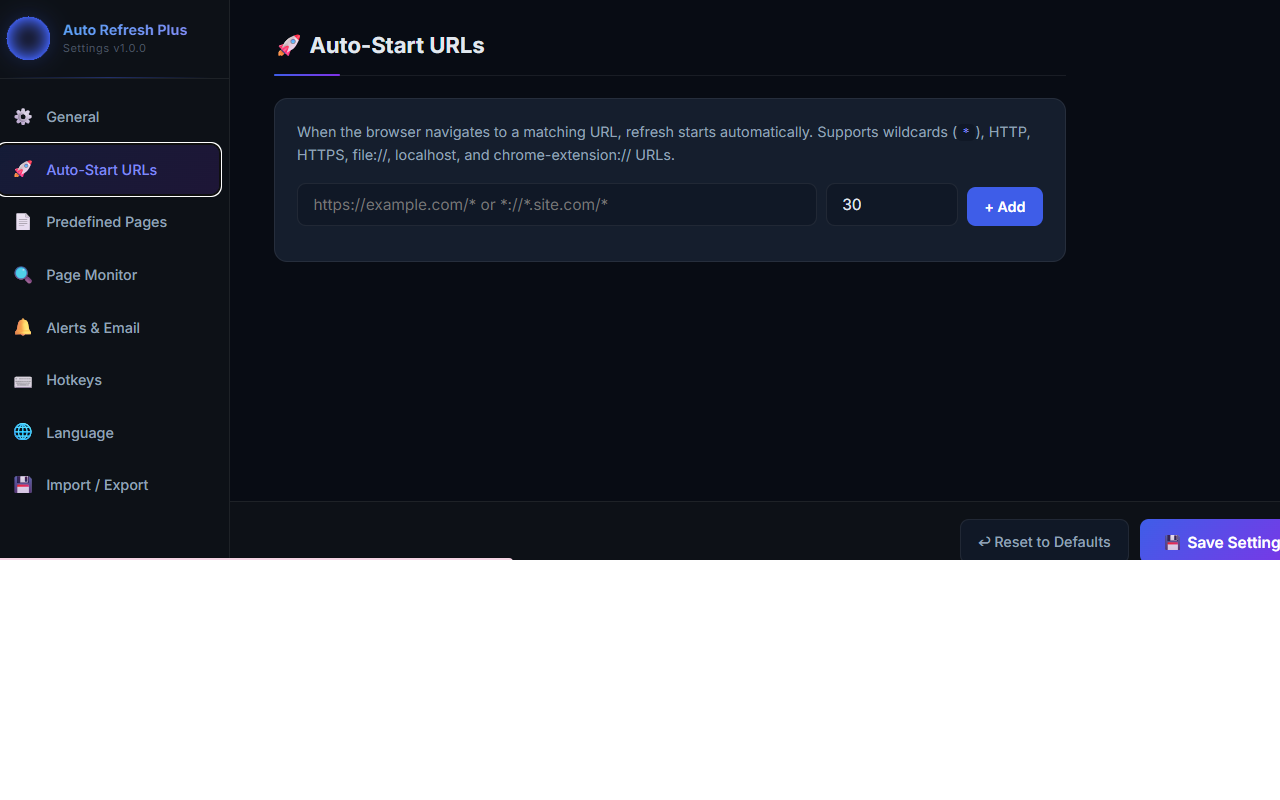
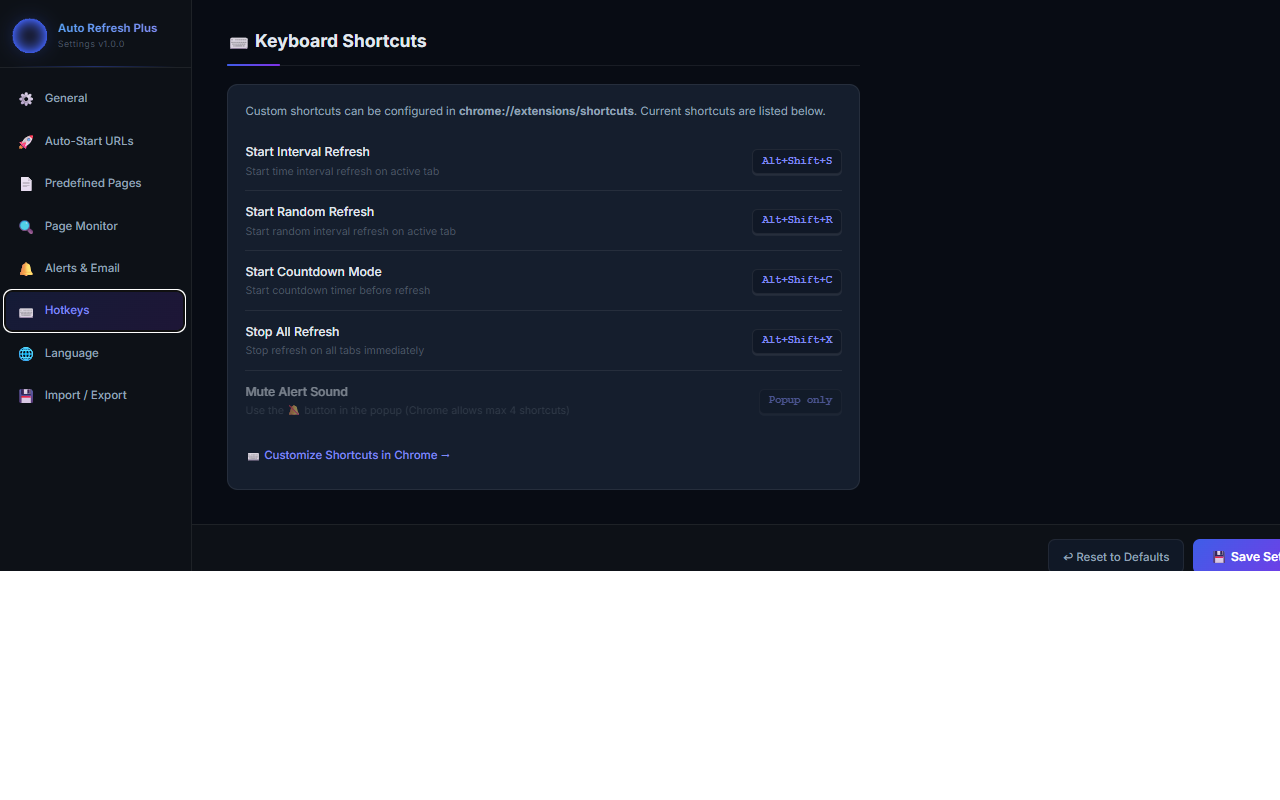
For power users, Auto Refresh Plus offers advanced functionalities such as auto-start based on URL patterns with wildcard support, refreshing predefined pages in background tabs, partial page updates via XHR refresh, and robust handling of redirects. The extension allows full import and export of the user’s configurations for easy backup or migration and supports a multilingual interface with more than 15 languages. Keyboard shortcuts can be customized with five configurable hotkeys, enabling rapid control over start/stop refresh modes, countdown timers, random intervals, and sound muting, all designed to facilitate hands-free operation.
From a privacy standpoint, the extension is fully transparent and secure. It collects no personal data, does not track users, operates without third-party servers, and stores all data locally in Chrome’s storage system. Optional anonymous error data collection through Google Analytics is available but can be disabled, ensuring user data remains private.
Auto Refresh Plus | Page Monitor is perfectly suited for developers, site testers, digital marketers, stock traders, students, and everyday users who want to stay up-to-date with live web content efficiently and responsibly. Whether for automating routine page reloads or sophisticated content monitoring and alerts, this extension delivers a reliable, customizable, and privacy-respecting solution.
Key Features:
- Automated Page Refresh Modes: Refresh pages at fixed intervals, random intervals to evade detection, or via countdown timers with color-coded, draggable overlays.
- Advanced Page Monitoring: Detect keywords or content changes using normal text, custom patterns, XPath, or regex; triggers include highlighting, auto-scroll, auto-click, stopping refresh, and focusing the browser.
- Multi-Tab Management: Independently monitor and refresh multiple tabs with live timer countdowns and active tab lists accessible from the toolbar popup.
- Comprehensive Alert System: Customizable sound alerts, browser push notifications, and optional email alerts (with verification) for keyword or content change detection.
- Customizable Behavior Settings: Includes hard refresh to bypass cache, automatic stop on user interaction, canonical URL usage, alert history retention, and configurable interval limits.
- Auto-Start & Predefined Pages: Automatically begin refreshing on matched URL patterns (wildcards supported) and refresh specified pages in background tabs.
- Import/Export & Multilingual Support: Easily backup or migrate settings and switch between over 15 supported interface languages; configure custom keyboard shortcuts for quick control.
How It Works:
1. Install Auto Refresh Plus and access its popup via the browser toolbar icon to start.
2. Select a refresh mode—fixed interval, random interval, or countdown timer—and specify the desired timing.
3. Optionally configure page monitoring by setting keywords or content patterns, then define alert actions such as highlighting, auto-click, sound, or notifications.
4. Manage multiple active tabs by adding them to the refresh list; monitor each tab’s refresh schedule, status, and alert history.
5. Access the options page to fine-tune settings including refresh behavior, notification preferences, auto-start URLs, predefined pages, and import/export functions.
6. Receiv…
Auto Refresh Plus | Page Monitor 是做什么的
Auto Refresh Plus | Page Monitor 是一款面向 Edge 的实用工具类扩展,主要用来解决浏览器里某类具体的小问题。官方对它的介绍是:Automatically refresh web pages at defined intervals with advanced page monitoring and content detection features.在微软 Edge 加载项商店上,它当前版本 1.0.0,评分 3.5(2 人评价),约 72 名用户。
适合什么人用
从功能定位看,Auto Refresh Plus | Page Monitor 更适合想补上浏览器原生缺失功能的用户。如果你平时只是偶尔遇到相关需求,用浏览器自带功能也能凑合;但如果这件事每天都发生,装一个专门处理它的扩展通常比手动操作省事得多。需要注意的是它作用于所有网站,装上后建议先观察一两天,确认不影响常用站点的正常使用。
怎么安装 Auto Refresh Plus | Page Monitor
- 打开微软 Edge 加载项商店上的官方页面;
- 点「添加到浏览器」并确认权限提示;
- 装好后在扩展列表里固定图标,方便随时开关。
本站只做索引与介绍,安装包来自官方商店。如果商店页面提示当前地区不可用,说明该扩展未在你所在区域上架。
常见问题
Auto Refresh Plus | Page Monitor 是免费的吗?
Auto Refresh Plus | Page Monitor 在微软 Edge 加载项商店免费提供下载。它是浏览器扩展,装上就能直接用,不需要注册账号。
Auto Refresh Plus | Page Monitor 安全吗?
它只申请了 0 项权限,范围比较克制,没有申请「读取所有网站数据」这种大权限。
Auto Refresh Plus | Page Monitor 支持哪些浏览器?
当前收录的版本来自微软 Edge 加载项商店,适用于 Edge。同一个扩展在其他商店可能有对应版本,但功能与版本号不一定相同。
怎么卸载 Auto Refresh Plus | Page Monitor?
在扩展管理页找到 Auto Refresh Plus | Page Monitor,点移除即可。它在本地保存的设置会一起清掉,不会残留数据。
权限清单 来自 manifest.json 原文
站点访问(可选) 1
<all_urls>
接口权限 9
activeTabalarmscontextMenusnotificationsoffscreenscriptingstoragetabswebNavigation
其他商店也有这款
同一款扩展在不同浏览器下的版本,权限与更新节奏可能不同
