Auto Downloader EN
Noyo · EEdge MV3
Auto start download process, skip wait, skip multi step, clicking buttons and closing tabs upon success.
<all_urls>),意味着它可以读取你在任意站点的页面内容,包括已登录的页面。这是许多扩展正常工作的必要条件,但也值得你确认来源可信。
截图
简介
Auto Downloader
Downloads on Autopilot, Skip the Clicks. Get the File.
What it Does:
__________________________________
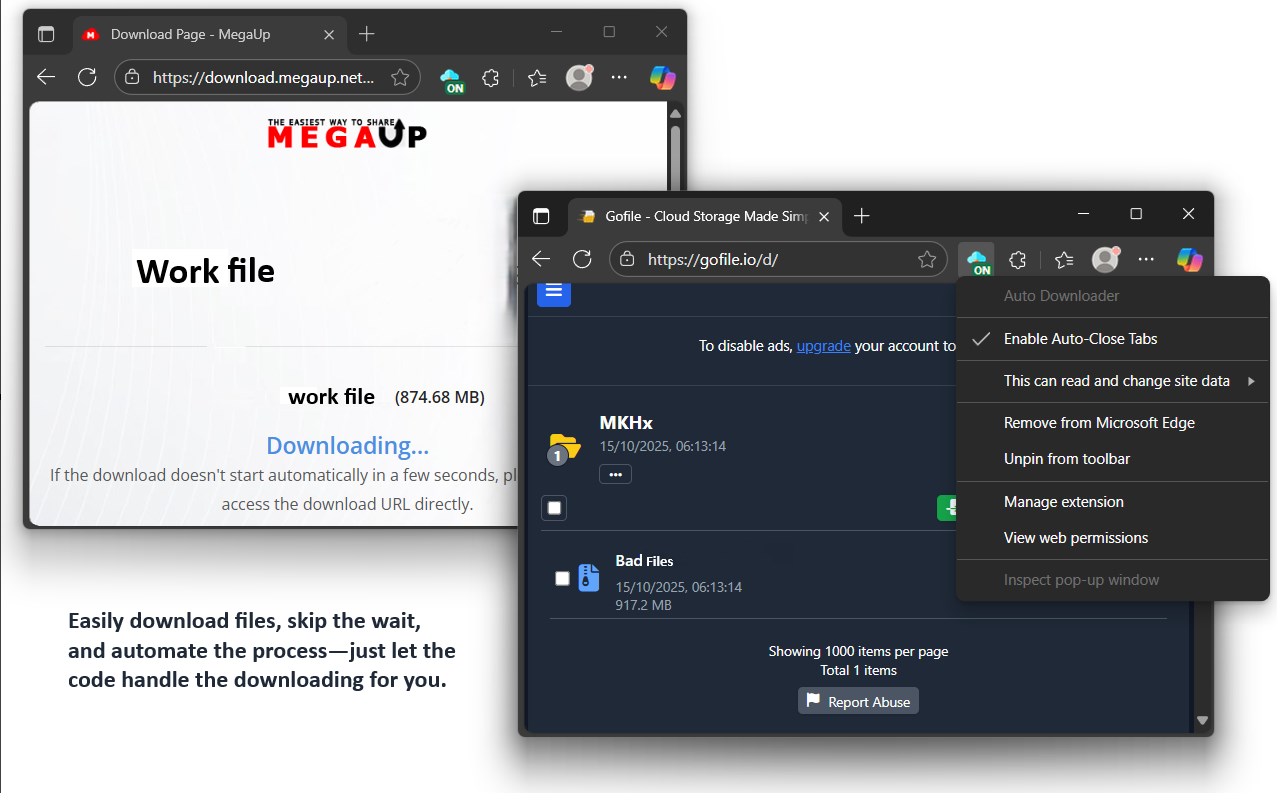
- Automates download pages on popular hosts: MegaUp, FuckingFast, PixelDrain, MediaFire, Gofile, DriveSeed, Video-Seed, BuzzHeavier, and Google Drive.
- Simulates human-like clicks, waits through timers, completes verify/continue steps, handles scan warnings, and redirects to direct downloads where possible to start downloads automatically.
- Shows small on-page toasts for status updates (waiting, clicked, success, error).
- Can auto-close the tab after a successful download (optional, toggle via context menu) and briefly shows a success count on the toolbar badge.
- Smart pausing: On Google Drive quota exceed, pauses automation for the session and notifies you. On Gofile high traffic, pauses for that tab and prevents auto-close.
- Lets you toggle the whole extension ON/OFF via toolbar icon click; uses your browser's native download manager.
How to Use It:
__________________________________
- Install the extension, then in the setup window:
- Click "Configure Auto-Downloads" and allow automatic downloads/multiple files if prompted.
- Click "Configure Pop-ups" and allow pop-ups on download sites.
- Make sure the toolbar badge shows "ON" (green); click the icon to toggle anytime.
- Optional: right-click the toolbar icon > check "Enable Auto-Close Tabs" to automatically close tabs after successful downloads.
- Visit a supported download page and wait a few seconds; the extension will inject and start automating.
- If the browser blocks a popup, multiple downloads, or direct redirect, allow it via the address bar icon.
- For Gofile folders with many files: allow "automatic downloads" when prompted for best results.
Use Cases:
__________________________________
- Speeding up downloads on hosts with timers, ads, and multi-step pages.
- Automatically clicking multiple download buttons in Gofile folders.
- Bypassing misleading ads to find and start the real download quickly.
- Handling Google Drive files: direct downloads, virus scan confirmations, and graceful pause on quota limits.
- Helping less-technical users avoid confusing pages.
- Repetitive downloads in classrooms, labs, testing environments, or workflows needing minimal interaction.
- Kiosks or automated setups requiring consistent file retrieval without manual clicks.
Auto Downloader 是做什么的
Auto Downloader 是一款面向 Edge 的效率工具类扩展,主要用来管住注意力、屏蔽干扰站点、记录时间。官方对它的介绍是:Auto start download process, skip wait, skip multi step, clicking buttons and closing tabs upon success.在微软 Edge 加载项商店上,它当前版本 1.3.6,约 121 名用户。
适合什么人用
从功能定位看,Auto Downloader 更适合想专注工作学习、减少无效刷网页的用户。如果你平时只是偶尔遇到相关需求,用浏览器自带功能也能凑合;但如果这件事每天都发生,装一个专门处理它的扩展通常比手动操作省事得多。需要注意的是它作用于所有网站,装上后建议先观察一两天,确认不影响常用站点的正常使用。
怎么安装 Auto Downloader
- 打开微软 Edge 加载项商店上的官方页面;
- 点「添加到浏览器」并确认权限提示;
- 装好后在扩展列表里固定图标,方便随时开关。
本站只做索引与介绍,安装包来自官方商店。如果商店页面提示当前地区不可用,说明该扩展未在你所在区域上架。
常见问题
Auto Downloader 是免费的吗?
Auto Downloader 在微软 Edge 加载项商店免费提供下载。它是浏览器扩展,装上就能直接用,不需要注册账号。
Auto Downloader 安全吗?
它只申请了 0 项权限,范围比较克制,没有申请「读取所有网站数据」这种大权限。
Auto Downloader 支持哪些浏览器?
当前收录的版本来自微软 Edge 加载项商店,适用于 Edge。同一个扩展在其他商店可能有对应版本,但功能与版本号不一定相同。
怎么卸载 Auto Downloader?
在扩展管理页找到 Auto Downloader,点移除即可。它在本地保存的设置会一起清掉,不会残留数据。
权限清单 来自 manifest.json 原文
站点访问(可选) 1
<all_urls>
接口权限 7
alarmscontentSettingscontextMenusnotificationsscriptingstoragetabs