1-Click Font Changer EN
1-Click Tutorials · EEdge MV3
Stable V4 Architecture with RTL & LineHeight support.
<all_urls>),意味着它可以读取你在任意站点的页面内容,包括已登录的页面。这是许多扩展正常工作的必要条件,但也值得你确认来源可信。
截图
简介
If you are looking for how to change chatbot font (or any website font), 1-Click Font Changer is the perfect tool to customize text instantly to your favorite language.
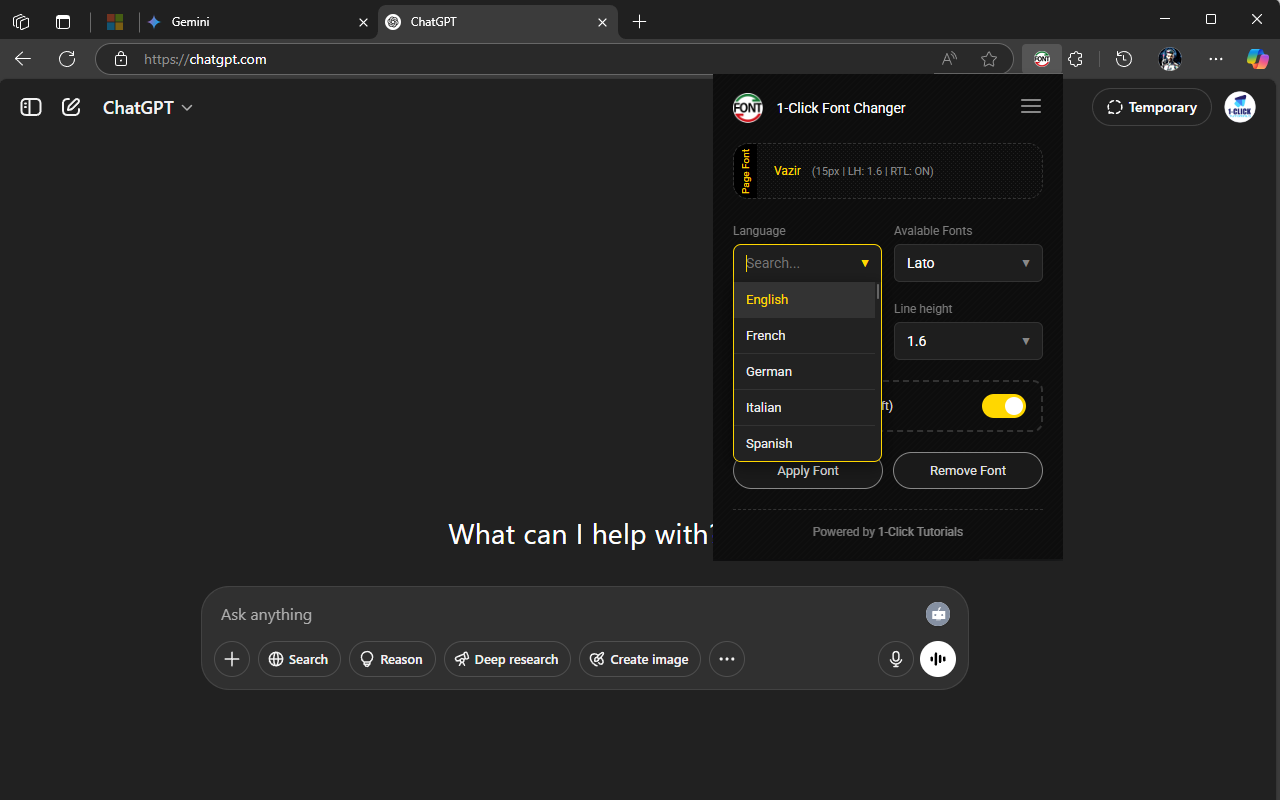
Just choose your language, pick a font, customize size & line height, and apply it!
Next time, your font style will be restored automatically.
🚀 New Update:
Now with RTL Support & Flawless performance on any AI Chatbot (ChatGPT, Gemini, Claude, etc.).
Description:
Tired of straining your eyes on hard-to-read fonts?
Let AI fix that! Engineered with the power of modern AI, 1-Click Font Changer is the ultimate readability tool for your browser. Say goodbye to illegible text and hello to a comfortable, personalized reading experience on any website.
New in Version 4.0: The "Stability & Accessibility" Update
We have completely re-architected the core to be faster, lighter, and smarter.
Smart Hibernation (Anti-Freeze): The extension now sleeps when you switch tabs, saving your CPU and battery. No more browser freezing on heavy sites!
Deep Shadow DOM Support: Fonts now penetrate complex layouts, making it perfect for Google Gemini, ChatGPT, and modern Web Apps.
RTL & Line Height Control: Full support for Right-to-Left languages and custom line spacing for maximum comfort.
Key Features:
Global Language Support (60+ Countries):
Choose from a curated selection of fonts optimized for specific regions. Whether you are reading in English, French, German, Spanish, Chinese , Persian, Arabic , Japanese, or Hindi, we have the perfect font for you.
Complete Text Control:
Font Family: Swap fonts instantly.
Font Size: Scale text up for better visibility.
Line Height (New!): Adjust the spacing between lines to reduce eye strain during long reading sessions.
RTL Mode (New!): Force correct Right-to-Left direction for languages like Persian and Arabic on websites that don't support it properly.
Optimized for AI Chatbots:
Struggling with the default fonts on ChatGPT or Gemini? Fix them with a single click! Our extension is specifically tuned to handle the complex code blocks and layouts of AI assistants.
Smart Per-Site Memory:
Your preferences are saved automatically for each website. Set it once, and it remembers your favorite font setup every time you visit.
Lightweight & Privacy-Focused:
Zero-Lag Performance: Uses new "Hibernation" logic to ensure your browser stays fast.
No Downloads Needed: All fonts are embedded (Base64) within the extension for instant loading.
No Tracking: We don't collect your data. Your settings stay on your device.
Beautiful & Accessible:
A clean, professional interface with full Dark Mode support that fits perfectly into your modern browser workflow.
What's New in Version 4.0
------
- Anti-Freeze Architecture: Implemented "Smart Watchdog" and "Hibernation" logic.
- Line Height Control: You can now adjust vertical spacing for better readability.
- The extension now pauses processing when tabs are hidden to save CPU and battery.
- RTL Support: Added a dedicated switch for Right-to-Left languages (Persian, Arabic, Hebrew).
- Shadow DOM Injection: Fixed font application on complex sites like Google Gemini and modern web apps.
- Enhanced Stability: Fixed iframe access (about: blank) and improved setting persistence across sessions.
- Detailed Feedback: New toast notifications show exactly what Font, Size, and Layout settings are applied.
🎯 Who is this extension for?
------
✅ AI & Chatbot Users:
RTL Users: Anyone struggling with correct Right-to-Left formatting in AI chats and code blocks.
Native Language Support: AI users looking for better, legible fonts for their specific native language.
Cleaner Interface: AI Enthusiasts experimenting with the latest text-based models who need a distraction-free environment.
✅ Developers & Vibe Coders:
Code Readability: "Vibe Coders" and developers looking for better fonts to read code on ChatGPT, Gemini, and Claude Sonnet.
Documentation: Digital Artists & Developers who need to improve legibility on documentation sites.
✅ Accessibility & Comfort:
Visual Aid: Anyone needing larger fonts or specific typefaces for better visibility due to weak vision.
Instant Customization: Anyone looking for a free tool to add custom fonts to any website instantly.
✅ Creators & Learners:
Content Creators: Those looking for a consistent reading aesthetic for research.
Beginners: Users who want a readable web without learning complex browser settings.
Licensing & Terms of Use:
------
This extension is free for personal, non-commercial use. For commercial licensing or partnership inquiries, please contact us. By using this extension, you agree to our Privacy Policy.
Contact Us:
------
YouTube: https://youtube.com/@1-click
Telegram: https://t.me/OneClickTuts
X (Twitter): https://x.com/1clicktuts
Bio Site: https://bio.site/1click
Welcome to the World of Intelligent Tools!
------
Hi! My name is Aidin, and I invite you to my YouTube channel, 1-Click Tutorials! 🎥
On our channel, we explore the newest and most interesting free AI tools together. From creating amazing images and videos to tools that simplify your daily tasks, we show you everything in short, practical videos. If you're interested in AI and learning new tricks, there's a place for you in our YouTube family!
👇 Subscribe now
https://youtube.com/@1-click
Make Tasks Easier: 1-Click Extensions:
------
To make your experience even more complete, we've developed a collection of free browser extensions that complement our channel's tutorials. These tools help you perform complex tasks with a single click.
👇 View and Install Extensions
https://1-clicktutorilas.github.io/1-Click-extensions/
Try Other 1-Click Apps:
------
To make your experience even more complete, we've developed a collection of free applications that complement our channel's tutorials. These tools help you perform complex tasks with a single click.
👇 View and Install Apps
https://1-clicktutorilas.github.io/1…
1-Click Font Changer 是做什么的
1-Click Font Changer 是一款面向 Edge 的实用工具类扩展,主要用来解决浏览器里某类具体的小问题。官方对它的介绍是:Stable V4 Architecture with RTL & LineHeight support.在微软 Edge 加载项商店上,它当前版本 4.0.4,评分 5(1 人评价),约 50 名用户。
适合什么人用
从功能定位看,1-Click Font Changer 更适合想补上浏览器原生缺失功能的用户。如果你平时只是偶尔遇到相关需求,用浏览器自带功能也能凑合;但如果这件事每天都发生,装一个专门处理它的扩展通常比手动操作省事得多。需要注意的是它作用于所有网站,装上后建议先观察一两天,确认不影响常用站点的正常使用。
怎么安装 1-Click Font Changer
- 打开微软 Edge 加载项商店上的官方页面;
- 点「添加到浏览器」并确认权限提示;
- 装好后在扩展列表里固定图标,方便随时开关。
本站只做索引与介绍,安装包来自官方商店。如果商店页面提示当前地区不可用,说明该扩展未在你所在区域上架。
常见问题
1-Click Font Changer 是免费的吗?
1-Click Font Changer 在微软 Edge 加载项商店免费提供下载。它是浏览器扩展,装上就能直接用,不需要注册账号。
1-Click Font Changer 安全吗?
它只申请了 0 项权限,范围比较克制,没有申请「读取所有网站数据」这种大权限。
1-Click Font Changer 支持哪些浏览器?
当前收录的版本来自微软 Edge 加载项商店,适用于 Edge。同一个扩展在其他商店可能有对应版本,但功能与版本号不一定相同。
怎么卸载 1-Click Font Changer?
在扩展管理页找到 1-Click Font Changer,点移除即可。它在本地保存的设置会一起清掉,不会残留数据。
权限清单 来自 manifest.json 原文
站点访问(可选) 2
http://*/*https://*/*
接口权限 3
activeTabscriptingstorage